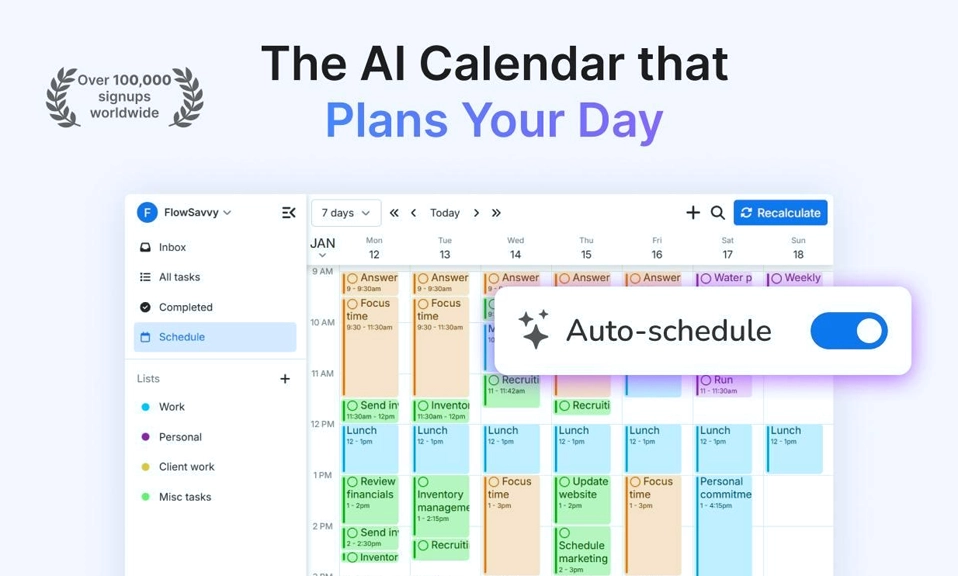
The modern calendar is a passive document. It tells you where to be, but it does not tell you how to fit everything else in. It does not protect your deep work from a colleague’s last-minute meeting request, and it certainly does not rebuild your day when a task runs long. That is the gap AI scheduling apps are designed to close, and in 2026, the category has matured into a set of tools that do genuinely different jobs. The right choice depends entirely on where your week breaks—whether you need a defender for your focus time, an autonomous planner that rebuilds your entire day, or a single inbox that pulls scattered tasks into one place.
Here are the 10 best AI scheduling apps in 2026, grouped by the specific problem each one solves best.
1. Motion: The AI That Plans and Defends Your Entire Day
What it is: Motion is the most aggressive auto-scheduler on the market. You enter your tasks, deadlines, and priorities, and it places them directly onto your calendar around existing meetings—without asking for per-task approval. When a meeting moves or new work arrives, it rebuilds the schedule automatically.
Why it saves time: Motion does not just fill gaps; it owns the planning process. Reviewers consistently describe it as the tool that saves the most time from automated scheduling, with real-time re-optimization that handles interruptions gracefully. It is an all-in-one platform, combining tasks, projects, calendar scheduling, an AI meeting notetaker, and docs in a single subscription.
The caveat: There is no free plan, and the learning curve is real. A persistent minority of reviewers also report support issues, including unanswered tickets and billing disputes. Pricing starts at $19/seat/month** (billed annually) for Pro AI, with Business AI at **$29/seat/month.
2. Reclaim.ai: The Calendar Defender
What it is: Reclaim is a calendar optimization layer that works on top of Google Calendar and Microsoft Outlook. It auto-schedules tasks, habits, breaks, and buffers around your meetings, defending the time you set aside for focused work under rules you define.
Why it saves time: Reclaim’s strength is defense. If you need two hours every morning to review applications, Reclaim blocks that time automatically so teammates can only book meetings before or after it. It syncs natively with Todoist, Asana, ClickUp, Jira, Linear, and Google Tasks, so the tasks you already track become the raw material for a protected schedule.
The caveat: Calendar support is limited to Google Calendar and Outlook, and the free Lite plan restricts scheduling to a one-week range with one calendar sync and one scheduling link. Paid plans start at $10/seat/month.
3. Akiflow: The Universal Inbox That Becomes a Plan
What it is: Akiflow is an AI daily planner that brings tasks, calendars, and a universal inbox into one app. Its Aki assistant plans and reschedules in conversation—in the app, by email, or on WhatsApp—and tasks from Gmail, Slack, Notion, Asana, Jira, Linear, and 50+ other tools land in a single inbox to be time-blocked onto your calendar.
Why it saves time: Akiflow solves the “scattered task” problem. Instead of checking five different apps to figure out what you should be doing, you pull everything into one place and block time for it as you plan the day. The two-way sync with Google Calendar, Outlook, and iCloud keeps the plan and the calendar in agreement.
The caveat: There is no free plan, and the 7-day trial requires a card and converts to a paid subscription unless cancelled. Pricing is **$19/month billed yearly** (or $34 monthly) for Pro, which includes every feature and unlimited integrations.
4. Lindy: The AI Teammate That Schedules From Slack
What it is: Lindy is a broader AI assistant that handles scheduling as one capability among many—alongside inbox triage, meeting prep, reports, and CRM updates. You can text or message it to handle calendar follow-up, and it builds and reschedules from Slack.
Why it saves time: For teams that already live in Slack, Lindy removes the friction of switching to a separate scheduling app. It handles the coordination work—finding times, sending follow-ups, adjusting when things change—as part of a larger automation workflow, rather than as a standalone calendar tool.
The caveat: Lindy is not a dedicated scheduler. If your only problem is protecting focus time or auto-planning tasks, a specialist tool like Reclaim or Motion will be more focused and likely more effective. Lindy’s value scales with how much of your work you want to automate beyond scheduling.
5. Sunsama: The Calm Daily Planning Ritual
What it is: Sunsama is built around a guided daily planning ritual that helps you review unfinished work, set priorities, and time-block your day. It is less about autonomous automation and more about building a deliberate, sustainable planning habit.
Why it saves time: Sunsama’s value is not raw automation—it is consistency. By turning daily planning into a short, structured routine, it prevents the accumulation of unplanned work that derails weeks. It is particularly well-suited to knowledge workers who feel overwhelmed by task backlogs and want a calmer, more intentional relationship with their calendar.
The caveat: If you want a tool that plans for you without your involvement, Sunsama will feel too manual. It is a planner’s planner, not an autonomous agent.
6. Trevor AI: The Free-Friendly Task-to-Calendar Bridge
What it is: Trevor is a lightweight AI daily planner that converts your task list into calendar blocks. Its “Plan My Day” feature offers unlimited free task scheduling, and you retain accept/reject control over the recommendations.
Why it saves time: Trevor is the best entry point for anyone who wants AI-assisted time-blocking without a subscription. It recommends times for your tasks rather than rebuilding your entire day, which makes it a gentler introduction to AI scheduling than Motion’s aggressive auto-planning.
The caveat: Trevor recommends times rather than autonomously rebuilding your schedule when things change. It is individual-only and does not offer the team coordination features of Reclaim or Motion. Pro starts at $5/month (billed annually).
7. Morgen: The Cross-Platform Calendar Consolidator
What it is: Morgen brings multiple calendars and task systems into one planning workspace. If you juggle Google Calendar, Outlook, iCloud, and task tools like Todoist or Notion, Morgen consolidates them into a single view and lets you plan across all of them.
Why it saves time: The time cost of fragmented calendars is real: you double-book yourself, miss a meeting on a calendar you forgot to check, or spend minutes switching between apps to find a free slot. Morgen eliminates that fragmentation. It is the best choice for freelancers, consultants, and anyone whose work spans multiple organizations and calendar systems.
The caveat: Morgen is a consolidation and planning tool, not an autonomous scheduler. It will not rebuild your day for you. Pricing starts at $25/user/month.
8. Vimcal: The Keyboard-First Scheduler for High-Volume Users
What it is: Vimcal is an AI-first calendar tool built for speed, with a keyboard-first interface, sub-100ms response times, natural-language event creation, and standout time-zone handling.
Why it saves time: For executives, recruiters, and anyone who schedules dozens of meetings a week, the bottleneck is often the interface itself. Vimcal removes the friction of clicking through date pickers and time-zone dropdowns. Its natural-language creation lets you type “lunch with Sarah next Thursday at 1pm” and have it appear on the calendar instantly.
The caveat: Vimcal is built for individual speed, not team coordination, and the keyboard flow is paid-only. It is free on iOS, with paid plans starting at $16.67/month.
9. Saner.ai: The Chat-First Brain-Dump Planner
What it is: Saner.ai is a chat-first daily planner. You do a brain-dump to its AI assistant, say “plan my day,” and it returns a time-blocked calendar.
Why it saves time: The lowest-friction way to plan is often to talk through what you need to do. Saner.ai turns that conversation into a structured schedule without requiring you to manually enter tasks into a database first. It is a good fit for people who think out loud and want the planning process to feel like a conversation rather than a data-entry exercise.
The caveat: Saner.ai is a younger product with a smaller ecosystem and less manual control than established tools like Reclaim or Motion. It has a free tier, with paid plans starting at $8/month (billed annually).
10. Google Gemini (Native): The Zero-Setup Option
What it is: If you already pay for Google Workspace, Gemini is the native AI assistant built into Google Calendar and the rest of the Workspace suite. It can summarize your schedule, draft event descriptions, and assist with planning without requiring a separate app or subscription.
Why it saves time: The biggest advantage is zero setup. There is no new tool to learn, no integration to configure, and no additional cost if you are already in the Google ecosystem. For users who need light scheduling assistance—a summary of the day, a quick draft of a meeting agenda—Gemini is sufficient and frictionless.
The caveat: Gemini is not a dedicated scheduling agent in the sense that Motion or Reclaim are. It does not auto-schedule tasks, defend focus time, or rebuild your day when meetings move. It is a helpful assistant inside the calendar you already use, not a replacement for the calendar’s planning logic.
Match the Tool to Your Specific Failure Point
The mistake most people make is shopping for “the best AI calendar tool.” There is no single best tool, because there are different jobs, and the right pick depends on where your week actually breaks.
If you want an autonomous planner that runs your entire day, choose Motion. It is the most aggressive and comprehensive, and it saves the most time from automated scheduling—if you can stomach the price and the learning curve.
If you want to defend focus time on a meeting-heavy calendar, choose Reclaim.ai. It is the clear winner for protecting deep work and habits, and its free Lite plan makes it the best value for individuals.
If your problem is scattered tasks across too many apps, choose Akiflow. Its universal inbox and conversational planning turn a dozen task sources into one time-blocked day.
If you want a free, gentle introduction to AI time-blocking, choose Trevor AI. It recommends times for your tasks without taking over your entire schedule.
If you just need a calmer daily planning ritual, choose Sunsama. It is less automation and more intention, and for many people, that is exactly what they need.
The tool that saves you the most time is the one that solves the problem you actually have—not the one with the longest feature list. Start with your biggest scheduling frustration, pick the tool built for that job, and let it earn its place in your day.