You have 200 pages of notes. Your exam is in 7 days. You are panicking.
In 2026, you do not need to panic. You need the right AI stack.
But here is the problem: There are 100 AI tools now. Most of them will make you worse at exams, because they just give you answers. You memorize nothing, you walk into the exam, and you blank.
The 2026 shift is study tutors, not answer machines: ChatGPT Study Mode and Gemini Guided Learning walk you through problems step by step instead of handing over the answer.
For exam prep, a combination of three approaches works best: NotebookLM (now Gemini Notebook) for quizzes and flashcards based on your lecture materials, ChatGPT or Gemini in study mode to explain difficult topics, and spaced repetition with Anki or Quizlet.
The best free stack for most students is NotebookLM, ChatGPT or Claude, Grammarly, and Quizlet, with a paid upgrade only where you feel a real limit.
Here are the 10 best AI study tools in 2026, what each one is actually good for, how much it costs, and the exact prompt to use so you learn, not cheat.
Quick Comparison
Tool | Best For | Price in 2026 | |
|---|---|---|---|
1 | Gemini Notebook | Studying from YOUR notes | Free |
2 | ChatGPT Study Mode | Tutoring, step-by-step | Free, Plus $20/mo |
3 | Claude Learning Mode | Essays, arguments, deep thinking | Free, Pro $20/mo |
4 | Gemini Guided Learning | Google ecosystem, school work | Free |
5 | Quizlet | Flashcards + practice tests | Free, Plus $35.99/yr |
6 | Anki | Spaced repetition, med/law | Free |
7 | Khanmigo | K-12 math, school tutoring | Free for teachers, $4/mo |
8 | Perplexity | Research with real citations | Free |
9 | Otter.ai | Lecture notes, transcripts | Free, paid plans |
10 | StudyFetch | Lecture videos to flashcards | Free, paid plans |
1. Gemini Notebook (Formerly NotebookLM) – Best Overall
Best for: Studying from your own lecture notes, slides, PDFs, and YouTube lectures.
Google renamed NotebookLM to Gemini Notebook in July 2026.
Google renamed NotebookLM to Gemini Notebook on 16 July 2026.
On July 16, 2026, Google renamed the service to tie it to the rest of the Gemini products. It’s the same NotebookLM: notebooks, sources, and links were kept, and the old notebooklm.google address redirects to notebook.google.
Our top pick is NotebookLM, Google’s source-grounded study tool, because it turns your own course materials into quizzes, flashcards, and audio lessons without charging you a cent.
The best free AI tool for studying is Gemini Notebook (formerly NotebookLM): upload your lecture notes, slides, PDFs or YouTube lectures and it answers from those sources with citations, and can make flashcards, reports and audio overviews, free with a Google account.
Why it wins: ChatGPT can hallucinate. Gemini Notebook cannot, because it only answers from YOUR sources. If it is not in your notes, it says so.
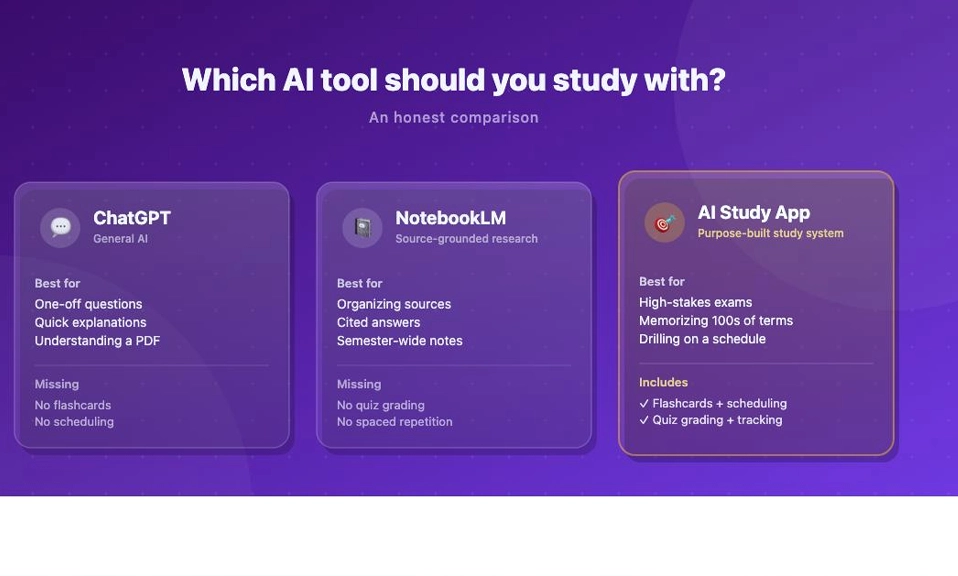
NotebookLM is strongest for source grounded research, Quizlet and Anki are strongest for flashcards, and Khanmigo is strongest for guided tutoring.
How to use it for exams:
- Upload all your lecture PDFs for one subject into one Notebook.
- Click Studio > Make Flashcards, then Make Quiz.
- Listen to the Audio Overview on your walk, like a podcast made from your notes.
- Ask: “Based only on my sources, what are the 5 most likely exam questions for Chapter 4? Give me the answers with page references.”
Price: Free; Google AI Plus $4.99/mo for more limits.
Watch out: Only as good as your uploads. If your notes are bad, its quizzes will be bad.
2. ChatGPT Study Mode – Best Tutor
Best for: Being tutored, not given answers.
For most students, ChatGPT (free) is still the best starting point, its Study Mode is now free for everyone and actively teaches rather than just handing over answers.
ChatGPT Study Mode (best for: Being tutored, not given answers): Free; Go $8/mo; Plus $20/mo.
Learning a new topic: ChatGPT Study Mode can teach step by step instead of only giving answers.
How to use it:
Type @study or open chatgpt.com/studymode, then say:
“Quiz me on photosynthesis. Ask me one question at a time. If I get it wrong, explain why and ask me again later. Don’t give me the answer straight away.”
ChatGPT Study Mode: type @study or open chatgpt.com/studymode, flashcards saved to your library, quizzes from uploaded notes.
Why it works: It forces active recall. It asks you Socratic questions, it makes you think, it does not just dump an answer.
Price: Free; Plus $20/mo for longer voice and faster model.
Watch out: It can still hallucinate on niche topics. Always verify facts with your textbook or Gemini Notebook.
3. Claude Learning Mode – Best For Essays And Deep Thinking
Best for: Essays, arguments, coding, and understanding why something is true.
Claude (Learning style): Essays, arguments, coding, Pro $20/mo ($17/mo yearly), Socratic questions.
Claude Learning, now an Anthropic skill called learn.
How to use it:
“Here is my essay paragraph on climate change. Don’t rewrite it. Tell me where my argument is weak, what evidence I am missing, and ask me 3 questions to make it stronger.”
Claude is better than ChatGPT at not giving you the answer. It will push back. It will say, “That claim needs evidence. Where did you get that?” That is exactly what a good tutor does.
Price: Free; Pro $20/mo.
Watch out: Claude is 18+. If you are under 18, use ChatGPT Study Mode or Gemini instead.
4. Gemini Guided Learning – Best If You Live In Google
Best for: School work inside Google Docs, Classroom, and YouTube.
The best AI tools for studying in 2026 are ChatGPT with Study mode, Claude with its Learning style and Google Gemini with Guided Learning, all three free and built to ask you questions instead of handing you answers.
Gemini Guided Learning is Google’s version of Study Mode. It is built into the Gemini app. If your school uses Google Workspace, this is the easiest one to use.
How to use it:
“Help me learn quadratic equations. Start with one easy example, let me try it, then check my work.”
Price: Free with a Google account.
Watch out: It is very similar to ChatGPT Study Mode. You do not need both. Pick one and stick with it.
5. Quizlet – Best For Flashcards And Practice Tests
Best for: Fast flashcards, and finding sets other students already made.
Add Quizlet if you want a dedicated flashcard and practice-test app (free plan; Plus $35.99/year).
Quizlet: Biggest flashcard library and practice tests, Free (capped); Plus $7.99/mo.
Quizlet: Fast flashcards and games, Yes, with ads and daily limits.
Spaced repetition on your phone: Quizlet, Free version available, AI features are in the paid version.
How to use it for exams:
- Search for your textbook, e.g., “Biology Campbell Chapter 7 Quizlet.” Someone has probably already made a set.
- Use Learn Mode, not just Flip. Learn Mode uses spaced repetition and forces you to type answers.
- Use AI: Upload your notes, and Quizlet Plus will turn them into flashcards and a practice test automatically.
Price: Free; Plus $7.99/mo or $35.99/yr.
Watch out: Free version is capped. And do not just flip cards. Typing the answer is what makes it stick.
6. Anki – Best For Medical, Law, And Certification Exams
Best for: Long-term memory. If you need to remember 10,000 facts for 2 years, Anki is king.
Anki is free, open-source, and uses the best spaced repetition algorithm in the world. Medical students swear by it. It is ugly. It is hard to learn at first. It works.
How to use it:
- Download Anki, free on desktop, paid on iPhone.
- Make 20 cards per day, max. Quality over quantity.
- Do your reviews EVERY day, even if it is only 10 minutes. Anki punishes you if you skip, because the algorithm is based on timing.
Price: Free on Android and desktop.
Watch out: Anki is not pretty. If you need pretty, use Quizlet. If you need to pass the USMLE, the Bar, or CFA, use Anki.
7. Khanmigo – Best For K-12 And Math
Best for: School students, Grades K-12, especially math and science.
Khanmigo: Grades K–12 and parents, Free for teachers, $4/mo or $44/yr, Built not to give the answer.
Khanmigo is Khan Academy‘s AI tutor and teaching assistant: homework help and personalized tutoring for learners, free for teachers.
NotebookLM is strongest for source grounded research, Quizlet and Anki are strongest for flashcards, and Khanmigo is strongest for guided tutoring.
How to use it:
Khanmigo will not give you the answer to your math homework. It will say, “What do you think the first step is? Why did you choose that?” It is like having a patient teacher who never gets tired.
Price: Free for teachers, $4/mo for students/parents.
Watch out: It is best for school-level subjects. For university, use ChatGPT or Claude instead.
8. Perplexity – Best For Research With Real Sources
Best for: Research papers, essays, and any time you need a citation.
The best AI study tools for college students in 2026 are NotebookLM (study from your own notes and slides, free), Gemini and ChatGPT (explain any concept), Perplexity (research with real citations), Knowt (free flashcards and active recall), Otter.ai (turn lectures into searchable notes), and Wolfram Alpha + Photomath (maths step by step).
Perplexity does not just answer. It shows you where it got the answer, with links. You can click and verify.
How to use it:
“What are 3 peer-reviewed studies on spaced repetition in 2024-2025? Summarize each with a citation.”
Use Perplexity for your essay research. Use Gemini Notebook for your class notes. They do different jobs.
Price: Free; Pro $20/mo.
Watch out: Always open the source. Do not cite Perplexity itself. Cite the paper it found.
9. Otter.ai – Best For Lecture Notes
Best for: Turning lectures into searchable notes.
You sit in a 2-hour lecture. You cannot write everything. Otter can.
Otter.ai records the lecture, transcribes it, and lets you search: “Where did the professor talk about mitochondria?” It finds it in 2 seconds.
How to use it for exams:
- Record lecture with Otter, with permission.
- After class, export the transcript to Gemini Notebook.
- Ask Gemini Notebook to make flashcards from the transcript.
Now your lecture becomes a quiz.
Price: Free with limits, paid plans for longer recordings.
Watch out: Always ask your professor if recording is allowed. Some universities ban it.
10. StudyFetch – Best For Lecture Videos And Slides
Best for: Courses built on recorded lectures, slides, and YouTube videos.
StudyFetch fits courses built on recorded lectures.
How to use it:
Upload your lecture recording or slides. StudyFetch turns them into flashcards, quizzes, and even an AI tutor that knows your course.
If your professor only posts videos and never gives notes, StudyFetch is a lifesaver. It watches the video for you and makes study material from it.
Price: Free with limits, paid plans for unlimited.
Watch out: Verify its flashcards. AI can mishear a lecture video, just like you can.
The Perfect Exam Stack: How To Combine Them
Do not use all 10 at once. You will drown. Use this 3-tool stack:
1. Learn: Gemini Notebook, upload your notes, make flashcards, listen to audio overview.
2. Practice: ChatGPT Study Mode or Claude Learning Mode, quiz yourself, Feynman explain, find gaps.
3. Memorize: Quizlet or Anki, spaced repetition every day for 15 minutes.
Add Perplexity for research, Otter.ai for lectures, Khanmigo for school math, Grammarly for writing, only if you need them.
The best AI-powered study tools for students are NotebookLM for turning your own notes into summaries and quizzes, Quizlet or Anki for flashcards, a general AI tutor such as ChatGPT, Gemini or Claude for explanations, Grammarly for writing support, and Notion for planning.
The Golden Rule: AI Is A Tutor, Not A Cheat Code
Here is the rule that will save your grades and your integrity:
Use AI to test you, not to answer for you.
Good prompts:
- “Quiz me.”
- “Ask me questions.”
- “Where are my gaps?”
- “Don’t give me the answer, give me a hint.”
Bad prompts:
- “Write my essay.”
- “Do my homework.”
- “Summarize this chapter so I don’t have to read it.”
If you use AI to avoid thinking, you will fail the exam, because the exam has no AI. If you use AI to think harder, you will ace the exam, because you have practiced thinking.
The best AI study tool in 2026
is not one tool. It is a system.
Gemini Notebook for your sources. ChatGPT Study Mode or Claude for tutoring. Quizlet or Anki for memory. Perplexity for research. Otter and StudyFetch for lectures.
Start with the free stack: Gemini Notebook + ChatGPT Study Mode + Quizlet Free. That alone will beat 90% of students who are still just rereading and highlighting.