Your brain is telling you one thing, and your eyes are telling you another. That conflict is what makes reading on a moving bus feel like a form of torture—and Android 17 has a hidden feature that finally fixes it.
If you’re one of the millions of people who can’t look at their phone in a car without feeling queasy, Google has built something specifically for you. It’s called Motion Assist, and it’s one of the most genuinely useful accessibility features to arrive on Android in years. The catch? It’s buried deep in the settings, and most people have no idea it exists.
Why Your Phone Makes You Sick
Motion sickness happens when your senses disagree. Your inner ear feels the car accelerating, braking, and turning—it knows you’re moving. But when you stare at a stationary phone screen, your eyes tell your brain you’re sitting still. That sensory mismatch is what triggers nausea, dizziness, and that familiar sinking feeling in your stomach.
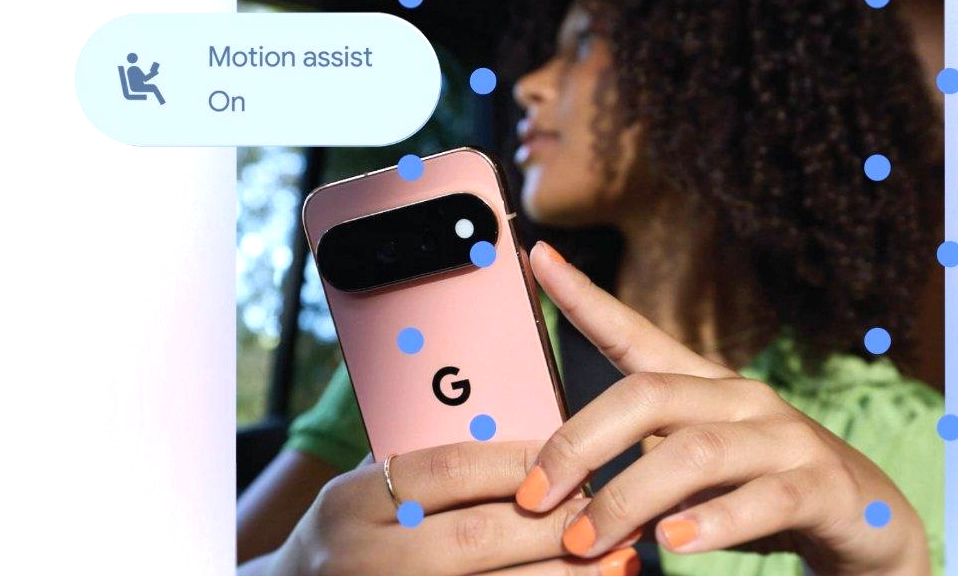
Motion Assist solves this by giving your eyes something to agree with. When the feature is active, it displays small animated shapes along the edges of your screen—bubbles, dots, or other simple forms—that move in real time based on your phone’s accelerometer and gyroscope. The shapes drift and shift as the vehicle moves, giving your brain a visual cue that matches what your body is feeling. Crucially, they stay at the edges, so whatever you’re actually reading, watching, or scrolling in the center of the screen remains completely unobstructed.
How to Turn It On
Motion Assist is part of Android 17 and requires an updated version of Google Play Services. It has been rolling out to Pixel phones and select Samsung Galaxy devices, and it’s also available on other Android 17 phones through the same Google services menu. If you don’t see it yet, try restarting your phone, as the rollout has been phased.
Here’s the direct path to find it:
Open the Settings app.
Tap your profile (the Google account section at the top).
Select All services.
Scroll down to the Personal & device safety section.
Tap Motion Assist and toggle it on.
The quickest route is simply to search for “Motion Assist” in the Settings search bar. If it doesn’t appear, your device or Play Services version may not have received the update yet.
Once you’re in the Motion Assist menu, you’ll see a toggle to “Start in a moving vehicle.” Turn this on, and your phone will automatically detect when you’re in a car, bus, or train and activate the motion cues without you having to remember to do it manually. Google also recommends adding a Quick Settings tile for Motion Assist, so you can toggle it on or off from any screen with a single tap—especially useful if the automatic detection doesn’t always trigger perfectly.
Make It Yours
Motion Assist isn’t a one-size-fits-all overlay. The Customize menu lets you change the color, shape (circle, square, pentagon, diamond), and opacity of the motion indicators. There’s also a Randomization option that automatically varies the color and shape every few seconds, which some users find more effective at keeping the visual system engaged.
A small system notification appears while Motion Assist is running, and tapping it gives you an instant option to turn the feature off—handy if you’ve arrived at your destination or the cues are distracting you.
A Few Things to Keep in Mind
This is for passengers, not drivers. Motion Assist is explicitly designed for people who are not operating the vehicle. Do not use it while driving.
It won’t work for everyone. One early user reported that the feature actually made their motion sickness worse because their device lagged, creating a mismatch between the visual cues and the actual movement of the car. Like any accessibility tool, its effectiveness varies from person to person.
It’s not a cure-all. Motion Assist reduces the sensory conflict, but it doesn’t eliminate the underlying cause of motion sickness. If you’re particularly sensitive, you may still need to take breaks, look out the window, or avoid reading altogether on long journeys.
Apple got there first. iPhone users have had a similar feature called Vehicle Motion Cues since iOS 18 in 2024. Motion Assist brings Android users to parity, and in some ways surpasses it with more customization options and a wider range of shapes.
Motion Assist is the kind
of feature that doesn’t sound revolutionary until you need it. It won’t make headlines or change how you think about your phone. But for anyone who has ever had to put their phone down on a road trip because staring at the screen made them feel ill, it is a small, quiet game-changer.
It’s hidden, it’s free, and it’s already on your phone—or will be soon. If you’ve ever suffered in silence on a car journey while your friends scrolled happily beside you, take five minutes to dig into Settings and turn it on. Your stomach will thank you.