Canva has spent the last decade convincing the world that anyone can be a designer. In 2026, it is trying to convince the world that anyone can be an AI-assisted designer, too. The question is no longer whether Canva is useful—it is whether the platform has evolved enough to remain the default choice for graphic design, or whether its all-in-one simplicity has become a limitation in an era of specialised, AI-native tools.
The short answer is that Canva is still the best tool for the vast majority of everyday design tasks, but it is no longer the best tool for every task. The 2026 version is faster, smarter, and more AI-powered than ever. It has also become more expensive, more complex, and more clearly aware of its own limits. Whether it is “worth it” depends entirely on what you are trying to design—and what you are willing to pay for the privilege.
What Canva Is (and What It Is Not)
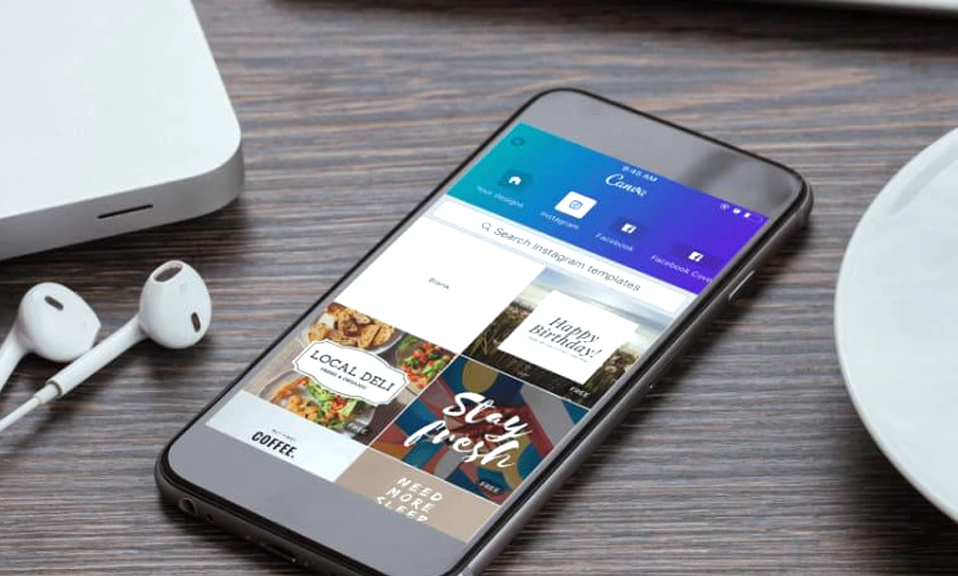
Canva is a cloud-based visual workspace that combines graphic design, presentations, video editing, social media scheduling, documents, whiteboards, and websites into a single subscription. It is built for non-designers who need to produce professional-looking content quickly, and it succeeds at that goal better than any other tool on the market. Its drag-and-drop interface, enormous template library, and real-time collaboration features have made it a favourite of small businesses, marketing teams, and freelancers who do not have the time or budget for Adobe’s professional suite.
What Canva is not is a replacement for professional design software. It does not offer the pixel-level control, advanced typography tools, or prepress-grade PDF export of Adobe Illustrator or Photoshop. It cannot handle complex vector illustration, soft masks, or the kind of precise layout work that demanding print projects require. It is a complement to professional tools, not a competitor—and Canva itself seems to have accepted that distinction.
The 2026 Upgrade: Canva AI 2.0 and the Conversational Design Era
The most significant development in Canva’s 2026 evolution is Canva AI 2.0, announced at Canva Create in April 2026. This is not a minor feature update. It represents a fundamental shift from a set of one-shot AI buttons (the old “Magic Studio”) to a conversational design partner that you can chat with directly inside the editor.
The practical implications are substantial. You can now describe what you want—”make this poster feel more premium,” “resize this campaign for Instagram Stories and LinkedIn,” “generate three alternative headlines”—and the AI executes the changes while keeping every element editable. The new Magic Layers feature turns static AI-generated images into editable layers, so you are not stuck with a flat, unchangeable output. Dream Lab, powered by Leonardo.ai, handles generative image creation, while Magic Eraser, Expand, and Grab cover photo editing tasks.
Perhaps the most strategically important feature is the Canva AI Connector, a first-party MCP server that lets external AI assistants like ChatGPT, Claude, Gemini, and Microsoft Copilot search, generate, edit, and export Canva designs directly from a chat interface. This is available on every account, including the Free tier, and it positions Canva as the destination workspace where AI-generated ideas become finished, collaborative designs.
The catch is that AI usage is metered at every tier. The Free plan allows up to 20 Standard or Premium AI uses per month. Pro and Business get ten and twenty times that allowance, respectively, but heavier usage requires the AI Pass add-on at $100 per month or additional top-ups. For casual users, the free allowance is generous. For teams producing high volumes of AI-assisted content, the meter can become a significant hidden cost.
The Pros: What Canva Still Does Better Than Anyone
It is genuinely easy to use. Canva’s greatest strength remains its accessibility for non-designers. The learning curve is measured in minutes, not weeks. The interface is intuitive, the templates are professionally designed, and the drag-and-drop workflow removes the technical barriers that make Adobe’s tools intimidating for beginners.
The template library is unmatched. Canva offers over 1.6 million templates on the Free plan and 3.6 million on Pro, covering everything from social media posts and presentations to business cards and T-shirt designs. For anyone who needs to produce content quickly, this is the single biggest time-saver in the entire design ecosystem.
Collaboration is seamless. Real-time editing, comments, shared brand kits, and approval workflows make Canva an excellent tool for small teams and client work. It is not as robust as enterprise-grade platforms for version control and complex governance, but for the vast majority of small businesses and freelancers, it is more than sufficient.
The free tier is functional, not a trial. This is a crucial distinction. Canva’s Free plan is not a crippled demo designed to force an upgrade. It includes 1.6 million templates, 4.7 million free assets, a basic Brand Kit, 5GB of storage, and a monthly AI allowance. For occasional users, it is genuinely possible to use Canva for months without paying anything.
It is a true all-in-one workspace. Canva has expanded far beyond graphic design. It now includes presentations, documents, whiteboards, spreadsheets, websites, video editing, and social media scheduling. For teams that need one subscription to serve marketing, sales, HR, and other non-design functions, this breadth is a genuine competitive advantage over Adobe Express and other rivals.
The Cons: Where Canva Falls Short
The subscription cost has climbed. Canva Pro is $18 per month or $180 per year for a single user. Business is $25 per person per month, or $250 per year. The Free plan is still available, but the best templates, AI features, and brand controls are locked behind the paywall. For occasional users, the price can be difficult to justify, especially when many of the AI features go unused.
Performance can lag on complex projects. Large presentations, animation-heavy designs, and long documents can experience slowdowns, particularly in browser-based workflows. Canva is optimised for accessibility first and brute power second, and it shows when you push the platform hard.
Customisation has limits. Compared with professional tools like Illustrator or Figma, Canva’s control over layout, typography, and export settings feels restrictive. It does not support soft masks, shading, tiling patterns, or PDF/X export, which makes it unsuitable for demanding print or prepress work. If you need a design to be exactly right at the pixel level, Canva will frustrate you.
The AI is good, but not the best. Canva AI 2.0 produces solid, mainstream output, but it lags behind specialised generative tools for high-end creative work. Teams that need the best possible AI-generated artwork or ad performance scoring will need to pair Canva with a specialist tool.
It is still not a professional design tool. Canva is a good-enough design tool, not a great one. It will help you produce a polished social media post in five minutes. It will not give you the craft, precision, or creative control that a professional designer needs to produce original, distinctive work. Canva’s template-driven approach can make designs feel familiar and samey if you do not consciously push beyond the defaults.
Canva vs Adobe Express: The 2026 Comparison
The most direct competitor to Canva is Adobe Express, and the choice between them is clearer than it has ever been.
Canva is the better default for teams that want one broad visual workspace with a deep template ecosystem, presentations, collaborative documents, and social publishing. It is the safer choice when the people making content do not depend on professional Adobe source files.
Adobe Express is the stronger choice when Photoshop, Illustrator, Acrobat, Adobe Fonts, or controlled brand templates are already part of the production chain. It offers a cleaner path into Adobe’s professional stack, and linked Photoshop and Illustrator assets can stay synchronised inside Express when the source files change.
On price, Adobe Express starts at $9.99 per month**, undercutting Canva Pro at **$15 per month (monthly billing). But Canva’s free tier is more generous than Adobe Express’s, and Canva’s template library is significantly larger.
The verdict: Choose Canva for breadth, templates, and a self-contained workspace. Choose Adobe Express if you are already embedded in Adobe’s ecosystem and need a last-mile tool for marketing teams. Neither is universally better; the right choice depends on where your source files live and who needs to edit them.
Is Canva Worth Using in 2026?
Yes—for most people, most of the time. Canva remains the most practical, accessible, and versatile design tool on the market for non-designers, small businesses, and marketing teams. The 2026 update has made it smarter and more powerful, and the free tier is still one of the best in the software industry.
But Canva is no longer the only option, and it is no longer the best option for every task. The rise of specialised AI tools and the growing sophistication of Adobe Express mean that Canva’s “good enough for everything” approach is facing its first real challenge in a decade. The platform has responded with Canva AI 2.0, and the response is largely successful—but it comes with metered AI usage, a higher price, and a more complex interface.
Choose Canva if:
You are a non-designer who needs to produce polished content quickly.
You want an all-in-one workspace for social media, presentations, documents, and video.
You value templates, collaboration, and a generous free tier.
You are willing to accept limited customisation and occasional performance lag.
Skip Canva (or use it alongside something else) if:
You need professional-grade precision, prepress export, or advanced typography.
You are a professional designer working on complex, original projects.
You need the absolute best AI-generated creative output.
You are price-sensitive and only design occasionally.
Canva’s greatest strength—its all-in-one simplicity—is also its biggest vulnerability in a market that is rapidly unbundling. The platform is aware of this, and Canva AI 2.0 is its attempt to stay ahead. For now, it is still the king of accessible design. But the crown is starting to feel a little heavier.