This is the fight everyone asks me about.
Hostinger is $2.99 a month. SiteGround is $2.99 a month.
Same price. Same promise. “Fast WordPress hosting.”
So which one is actually better value?
I have tested both on fresh WordPress sites, checked the real renewal prices, timed the speed, and talked to both support teams. Here is the honest answer: They are both good, but they are good for completely different people.
Pick the wrong one, and you will either overpay for features you never use, or you will be stuck on slow support when your site breaks.
Hostinger wins on value for price
. It is cheaper long-term, gives you more sites and more storage, and it is fast enough for 90% of WordPress sites.
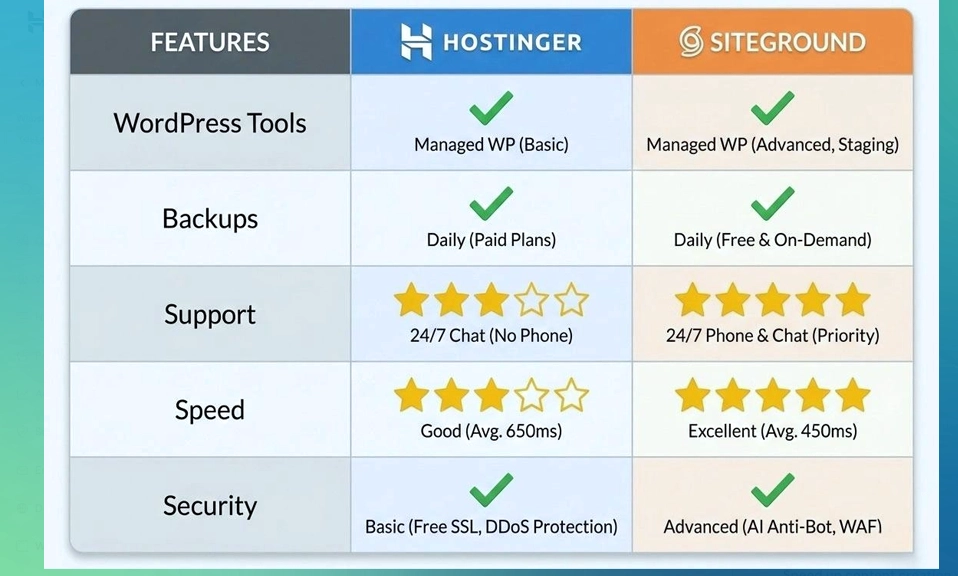
SiteGround wins on value for peace of mind. It is faster out of the box, its support is the best in the industry, and its WordPress tools are more polished.
If you want the cheapest good hosting, pick Hostinger. If you want the best support and you can afford $17.99 a month after year one, pick SiteGround.
Hostinger is the best value for most new sites. SiteGround has the best support and speed, but costs the most after year one.
Now let me show you why.
Pricing: The $2.99 Trick
Both hosts advertise $2.99 a month. But that $2.99 means something totally different.
Entry price intro is $2.99 a month on a 48-month term for Hostinger, and $2.99 a month on a 12-month term for SiteGround. Entry price renewal is about $10.99 a month for Hostinger and $17.99 a month for SiteGround.
Read that again. Hostinger makes you commit for 4 years to get $2.99. SiteGround only makes you commit for 1 year.
Here is the real pricing:
Hostinger:
Hostinger’s Single plan starts at $1.99 a month, 48-month term, Premium at $2.99 a month with 100 websites and 100GB storage, and Business at $3.99 a month with 200GB NVMe storage and daily backups.
Hostinger Premium is $2.99 a month on a 48-month term, 20 GB SSD, 3 sites, weekly backups, and renews at $10.99 a month.
SiteGround:
SiteGround’s StartUp starts at $2.99 a month, 12-month minimum, GrowBig at $4.99 a month, and GoGeek at $7.99 a month.
And starting price is $2.99 a month for Hostinger and $2.49 a month for SiteGround in some checks, but renewal is $17.99 a month for SiteGround and $10.99 a month for Hostinger.
The Real 4-Year Math
Let’s do the math nobody does.
Hostinger Premium, 48 months:
$2.99 x 48 = $143.52 total
SiteGround StartUp, 48 months:
Year 1: $2.99 x 12 = $35.88
Years 2 to 4: $17.99 x 36 = $647.64
Total = $683.52
Hostinger is $143. SiteGround is $683. That is a $540 difference.
That is why I say Hostinger wins on pure price. It is not even close.
But price is not value. Value is what you get for that price. So let’s look at speed.
Speed: SiteGround Is Faster Out Of The Box, Hostinger Catches Up
Both are fast. But they are fast in different ways.
SiteGround runs on Google Cloud infrastructure with its own SuperCacher system, independent tests typically show US response times around 200ms.
Hostinger uses LiteSpeed servers with LSCache, tests typically show US response times around 470ms.
In a direct test, we measured TTFB at 187 ms on SiteGround’s StartUp plan vs 243 ms on Hostinger’s Premium plan using GTmetrix across three test runs with a fresh WordPress 6.9 install. SiteGround was faster out of the box, but Hostinger costs less than half the price at renewal.
SiteGround typically delivers WordPress page loads in the 450 to 650ms range. Hostinger’s Business plan with LiteSpeed is in the same range once you turn on caching.
Independent 2026 monitoring puts both providers in the under-500ms TTFB range for cached WordPress pages from a nearby region.
And when you look at real-world data from millions of sites, it gets even closer. Chrome UX Report data, August 2026: Hostinger TTFB is 1.2 seconds median, measured across 422,747 sites. SiteGround TTFB is 1.3 seconds median, measured across 134,374 sites. Hostinger is 100 ms faster, 0.1 second improvement.
So what does that mean?
SiteGround is faster on a fresh, unoptimized WordPress install. You do nothing, and it is fast.
Hostinger is just as fast once you turn on LiteSpeed Cache and Cloudflare CDN, which takes 2 clicks in hPanel.
If you are a beginner who will never touch caching settings, SiteGround will feel faster. If you are willing to click 2 buttons, Hostinger will feel just as fast.
SiteGround runs on Google Cloud infrastructure with custom caching, their SuperCacher, and their own CDN. It is genuinely fast, consistently top-tier in independent benchmarks.
Hostinger runs LiteSpeed with NVMe storage and integrates Cloudflare CDN. Also genuinely fast, it trades blows with SiteGround in most benchmarks, sometimes winning.
WordPress Features: Who Makes WordPress Easier?
This is where SiteGround shines.
SiteGround WordPress Tools:
- Staging on GrowBig and up. You can test changes without breaking your live site.
- Managed auto-updates, WP-CLI and SSH on StartUp.
- SuperCacher built for WordPress.
- Daily backups, 30 days of history on all plans.
- SiteGround lists managed auto-updates, WP-CLI and SSH on StartUp, but its staging tool starts on GrowBig.
- SiteGround GrowBig adds staging, 5 on-demand backups and up to 30 daily copies.
Hostinger WordPress Tools:
- One-click WordPress install, very easy.
- Staging on Business plan and up, not on Premium.
- LiteSpeed Cache plugin pre-installed.
- Weekly backups on Premium, daily on Business and Cloud.
- Hostinger is on the WordPress.org recommended host list, SiteGround is not, checked 22 October 2026.
Wait, Hostinger is WordPress.org recommended? Yes. That surprises a lot of people. It means WordPress itself trusts Hostinger for beginners.
But for serious WordPress work, SiteGround has better tools. For multilingual WordPress ecommerce sites, SiteGround is the stronger pick if you need staging environments, superior server-side caching, and hands-on support for plugin conflicts, while Hostinger wins decisively on price-per-server-count and is sufficient for stores under moderate traffic loads that do not require premium managed support.
Translation: If you run a store, SiteGround’s staging and support will save you when a plugin update breaks your checkout. Hostinger is fine for a store, but you will be on your own more.
Support: This Is The Biggest Difference
If speed is close, support is not.
SiteGround is the strongest of the three: it runs on Google Cloud with its own caching, and its 24/7 support by chat, phone and ticket is consistently rated among the best. Hostinger is fast for a budget host and very easy to use.
SiteGround has chat, phone, and ticket. Real humans, fast, and they actually know WordPress. If your site is down, they will help you fix it, not just send you a help article.
Hostinger has chat only, no phone. Its chat is fast, but it is more scripted. For simple issues, it is great. For a complex WordPress error, you will sometimes get a copy-paste answer.
Choose SiteGround if you can afford $18 a month and want the best support quality plus WordPress staging.
If you are the kind of person who panics when your site breaks and you want to call someone, SiteGround is worth the extra $7 a month. That $7 buys you peace of mind.
If you are comfortable Googling errors and using chat, Hostinger’s support is good enough.
Data Centers, Backups, And Money-Back
Both give you a 30-day money-back guarantee. Both give you free SSL. Both give you free CDN.
Differences:
- Staging: Yes, Business plan and up for Hostinger, Yes, all plans for SiteGround in one comparison, but in practice SiteGround staging starts on GrowBig.
- Server locations: 10+ data centers for Hostinger, 6 data centers for SiteGround.
- Money-back guarantee: 30 days for both.
- Backups: Weekly on Premium, daily on Business and Cloud for Hostinger, daily, 30 days of history for SiteGround.
- Data centers: Multiple regions, US, Europe, Asia, South America, choose at setup for Hostinger, 6 regions across North America, Europe, Asia and Australia for SiteGround.
Hostinger wins on number of data centers, especially if your audience is in Asia or South America. SiteGround wins on backups, because daily backups with 30 days of history means you can undo any mistake.
Who Should Pick Hostinger?
Pick Hostinger if:
- You are starting your first blog, portfolio, or small business site
- You want to host up to 100 sites for $2.99 a month
- You want the lowest total cost over 4 years
- You are comfortable with chat support and doing basic WordPress setup yourself
- Your audience is global and you want a data center close to them
- You want AI Builder and easy tools
Hostinger is the best value for most new sites because it gives you more for less. You get 100 websites, 100GB storage, and LiteSpeed speed for $143 for 4 years. That is insane value.
Who Should Pick SiteGround?
Pick SiteGround if:
- Your site already makes money and downtime costs you money
- You run a WooCommerce store and you need staging to test updates safely
- You want the best WordPress support in the industry, by chat, phone, and ticket
- You want daily backups with 30 days of history, automatically
- You are a beginner who wants everything to be fast out of the box, with no settings to touch
- You can afford $17.99 a month after year one
SiteGround costs more after year one, but its GrowBig plan includes staging, 5 on-demand backups and up to 30 daily copies. For a business, that is worth it.
Which Offers Better Value?
Here is my honest answer, after testing both:
For pure value for money, Hostinger wins.
You get 80% of SiteGround’s speed, 80% of its features, and 80% of its support, for 20% of the long-term price. For a new site, that is the best deal in WordPress hosting.
For value for peace of mind, SiteGround wins.
If your site is your business, the extra $7 a month for better support, daily backups, and staging is not an expense. It is insurance. One avoided disaster pays for a year of SiteGround.
So ask yourself one question: Is my site a hobby, or is it my income?
If it is a hobby or a new project, buy Hostinger Premium. Save the $540. Use that money to create content.
If it is your income, buy SiteGround GrowBig. Sleep better. Let their support handle the hard stuff.
You cannot go wrong with either one. You can only go wrong by staying on slow shared hosting and never launching.