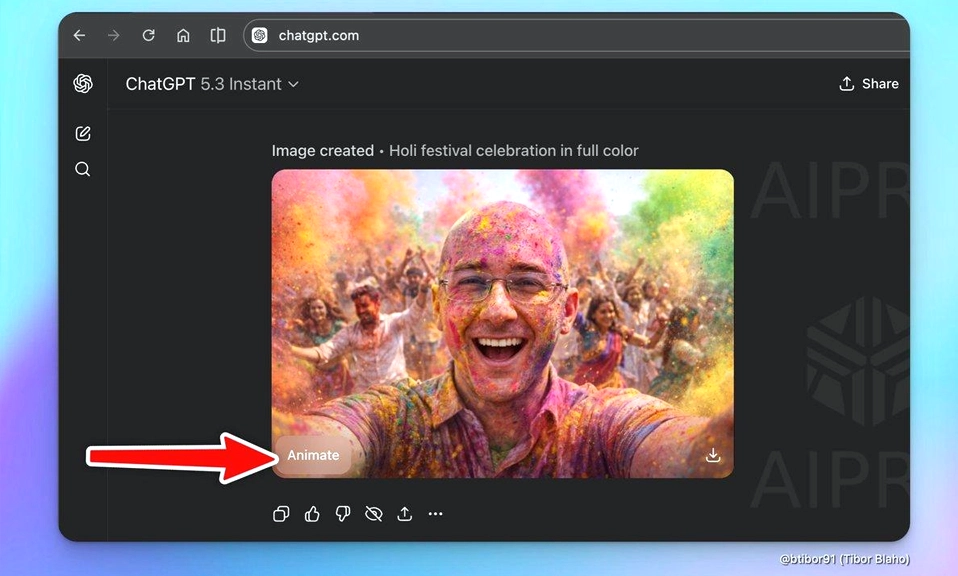
OpenAI just turned ChatGPT into a GIF factory. On November 4, 2026, the company rolled out Images 2.6, and the headline feature is disarmingly simple: you can now describe a scene, or upload a photo, and get back a short, looping animated GIF without ever leaving the chat window.
It sounds like a small thing. It is not. For years, turning an AI-generated image into motion meant a clumsy workflow: generate frames one by one, export them, stitch them together in a separate tool, and hope the character didn’t morph into a different person between frames. Images 2.6 eliminates all of that. The GIF is generated natively, edited conversationally, and exported in a format you can actually share.
Here is how it works, what it does well, and where it still falls short.
How It Works: Sprite Sheets, Not Video
The most important technical detail about Images 2.6’s GIF feature is what it is not. It is not a video generator. OpenAI is not using the temporal diffusion models that power tools like Runway or Pika. It is not a resurrection of Sora—OpenAI shut that app down in March 2026 after it reportedly lost roughly $1 million a day.
Instead, Images 2.6 generates a sprite sheet—a single image containing a grid of sequential frames—then slices it into individual frames and stitches them into a loop. OpenAI’s own examples show a grid of six frames (three columns, two rows) that, when played in sequence, create a short animation.
This approach has advantages. It avoids the high inference latency of video models, and it keeps the character and background more consistent from frame to frame, because all the frames are generated together in a single image. But it also sets hard limits: the animations are short (two to four seconds), silent, and not designed for complex camera movements or dense 3D scenes.
What You Can Do: Prompts, Photos, and Multi-Turn Edits
The feature is available across ChatGPT, Codex, and the API, on web, desktop, and mobile, for all subscription tiers. There are three main ways to use it.
Start from a prompt. You can describe the GIF you want in natural language—”a pixel-art cat sipping coffee while rain falls outside”—and the model generates a seamless loop with smooth loop points.
Start from an image. You can upload a photo or a rough sketch and have the model animate it. OpenAI suggests this is useful for brand mascots, social media reactions, memes, and animated storyboards. You can also upload a rough drawing and have the model generate a more complete version before animating it.
Edit conversationally. If something is wrong, you don’t have to start over. You can prompt changes—”make the steam rise faster,” “change the mug to blue”—and the model updates the animation without rebuilding it from scratch. You can also adjust playback speed, view individual frames, and edit a single frame before sharing.
Reuse reference images. You can save a reference image of a character, pet, or yourself, give it a name, and call it up in future prompts with an @mention, so you don’t have to upload it again. This feature is currently limited to ChatGPT and is not yet available in the API.
The API: Two Models, One Price
For developers, Images 2.6 introduces two distinct models under the same pricing structure.
GPT-Image-2.6 Flare is built for speed. At low quality settings, it can generate an image in as little as six seconds—roughly 2.6 times faster than the previous generation. OpenAI says it also improves layout quality for posters and product shots.
GPT-Image-2.6 Sunburst is built for quality. At medium and high settings, it produces more accurate images and maintains character, product, and brand details more consistently across multi-turn edits. Its speed improvement is modest—roughly 1.15 times—which one analysis described as “close to a rounding error” for batch work.
Pricing is unchanged from Images 2.5: $8 per million image input tokens**, **$30 per million image output tokens, $5 per million text input tokens**, and **$1.25 per million cached text input tokens.
The Limitations: What the Demos Don’t Show
The feature is impressive, but it is not magic. The hands-on tests reveal consistent weaknesses.
Details drift. In a test of a glass butterfly, the wings and shadows moved correctly, but the fine patterns on the wings changed from frame to frame, and the closing rhythm of the two wings was not perfectly synchronized. The verdict: good for a fun loop, but not for accurate biological motion.
Object relationships break. In a test of a girl holding an umbrella and petting a dog, the action sequence—reaching out, touching the dog, closing eyes, pulling back—was readable. But the other hand, which was supposed to be holding the umbrella, ended up near the knee. The umbrella’s support was never explained.
Frame count and size don’t always follow instructions. The model doesn’t always respect the exact number of frames or dimensions you ask for.
It’s not a video tool. OpenAI is explicit that this is for animated storyboards and character movement exploration, not for producing finished video. The animations are short, silent, and limited in complexity.
Moderation still has gaps. The system card acknowledges that GIF moderation can miss things, and OpenAI says it is continuing to refine its safety filters.
Images 2.6 is not a revolution
in AI video. It is a practical, accessible expansion of what ChatGPT can do with images—and for a lot of people, that is more useful than a video generator they would rarely use.
The ability to turn a prompt or a photo into a looping GIF, edit individual frames, and adjust speed is a genuine workflow improvement. The sprite-sheet approach is clever: it sidesteps the latency and consistency problems that plague video models, and it produces something that is immediately shareable. For social media creators, marketers, and anyone who has ever wanted to make a custom reaction GIF without opening Photoshop, this is a meaningful update.
But it is not a replacement for dedicated animation or video tools. The loops are short, the details are imperfect, and the model still struggles with complex object interactions. It is a first draft tool, not a final-cut tool.
OpenAI says users now generate more than 4 billion images per week across ChatGPT and its API, up from 3 billion in September. Images 2.6 is a bet that the next billion will move.