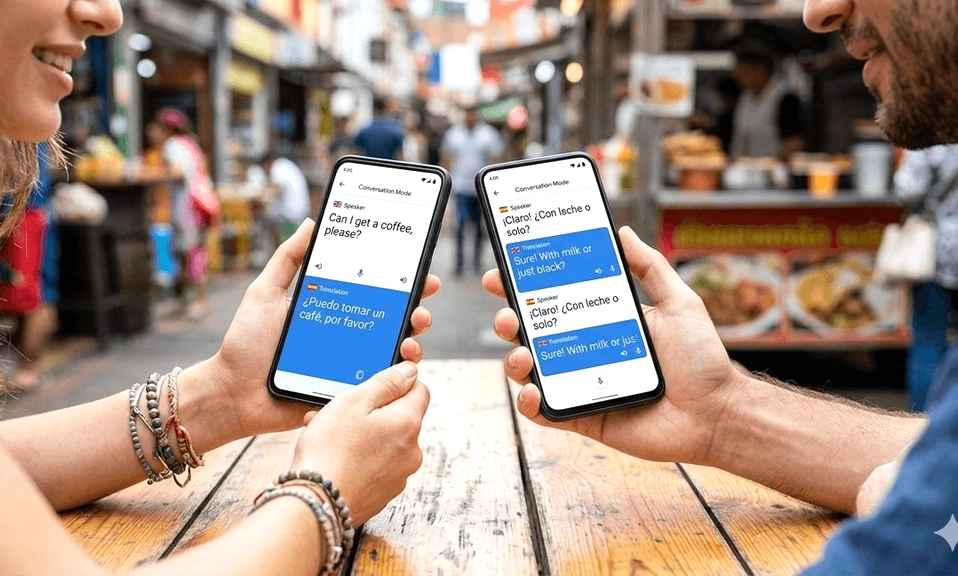
The days of fumbling through a phrasebook or playing an awkward game of charades are over. Your smartphone has quietly become a real-time interpreter, capable of translating a live conversation as it happens, preserving not just the words but the tone and rhythm of the speaker’s voice. Whether you’re navigating a foreign city, closing a business deal across the globe, or simply trying to chat with a new neighbor, the technology to talk to anyone, anywhere, is already in your pocket.
The shift is powered by a new generation of AI models. Google’s Gemini 3.5 Live Translate, for instance, is a major leap forward. Unlike older systems that wait for a speaker to finish a sentence before translating, this model processes speech continuously, staying just a few seconds behind the speaker for a fluid, natural-sounding conversation. It can automatically detect over 70 languages, so you don’t even need to manually select them, and it aims to preserve the original speaker’s intonation, pacing, and pitch—making the translated voice sound like the person speaking, not a robot.
Apple is making similar strides, deeply integrating its Live Translation features into iOS. This isn’t just a separate app; it’s woven into the fabric of your daily communication, working within Messages, the Phone app, and FaceTime.
Here is your guide to using these powerful tools on both Android and iOS.
📱 How to Use Real-Time Translation on Android
The primary hub for Google’s translation magic is the Google Translate app. The newer Gemini-powered features are rolling out to the app on both Android and iOS, but Android users get a couple of exclusive perks.
The Core Experience: Conversation Mode
This is the classic, turn-based mode that works reliably for most situations.
Open the Google Translate app.
At the bottom of the screen, ensure your language and the other person’s language are selected correctly.
Tap the Conversation icon (it looks like two speech bubbles).
Now, simply tap the microphone button and start speaking. The app will automatically detect who is speaking and translate both sides of the conversation, reading the translation aloud.
The Next Level: Live Translate with Headphones
This is the closest to having a personal interpreter in your ear.
Connect a pair of headphones (any pair will work) to your phone.
Open the Google Translate app.
Tap the “Live translate” button at the bottom left of the screen.
Now, as people around you speak in a foreign language, you’ll hear a real-time translation directly through your headphones. It’s perfect for understanding lectures, tours, or even TV shows in another language.
The Android Exclusive: Listening Mode
If you don’t have headphones, Android has a clever solution. In the Live Translate mode, you can use the new “Listening mode” . Simply hold the phone to your ear like you’re on a regular call, and the translated audio will stream through the earpiece, keeping the conversation discreet.
🍏 How to Use Real-Time Translation on iPhone
Apple’s approach is about seamlessness. The Translate app is the dedicated hub, but the real power is its system-wide integration, available on iPhones that support Apple Intelligence.
The Dedicated App: Conversation Mode
This is the most direct way to have a face-to-face chat.
Open the Translate app.
Tap the Conversation tab at the bottom.
Tap the microphone button and start speaking. The app will display chat bubbles with the translated text.
For a more natural back-and-forth, tap the “…” icon, turn on Auto Translate, and the app will automatically detect when you start and stop speaking, no button taps required.
If you’re sitting across from someone, tap the Face-to-Face icon. The screen will split, showing the conversation right-side-up for each person.
The Hidden Gems: Live Translation in Your Apps
This is where Apple’s integration shines.
In Messages: If you receive a text in another language, open the message, tap the person’s name at the top, and turn on Automatically Translate. The conversation will be translated in real-time as you type and receive messages.
In Phone Calls: During a call, tap the More button and select Live Translation. The other person will hear a spoken translation of what you say, and you’ll hear a translation of their response, with an on-screen transcript for reference.
In FaceTime: Similar to calls, you can start a Live Translation during a FaceTime call to see translated live captions appear on the screen as both parties speak.
💡 Beyond the Built-In Tools
While Google and Apple offer the most integrated experiences, other powerful apps are worth exploring for specific needs.
Microsoft Translator: This is the best choice for group conversations. It allows up to 100 people to join a single session, each reading captions in their own language on their own device—ideal for multilingual meetings or tours.
Papago: A fantastic alternative that is particularly strong for Asian languages, especially Korean and Japanese. It often provides more natural and context-aware translations for these languages than Google Translate.
DeepL: While less focused on live conversation, DeepL is renowned for producing incredibly natural and nuanced translations for text, making it a great companion app for understanding written materials when you need the highest level of accuracy.
Real-time translation is no longer
a sci-fi fantasy. It’s a practical, accessible tool that can fundamentally change how you experience the world. The technology is not perfect—it can stumble over heavy slang, crosstalk, and very specific technical jargon. But for the vast majority of everyday interactions, it is a game-changer. The next time you find yourself lost in translation, remember that the solution is already in your hand. You just need to press the right button.