You want to watch a video, so you open your browser and type
youtube.com. Within a fraction of a second, the website loads.But behind the scenes, your computer doesn’t actually know what “youtube.com” is. Computers don’t understand letters and words; they only understand strings of numbers, like
142.250.190.46.So, how does your browser know where to go? Enter DNS: the unsung hero of the internet.
You’ve probably heard the term thrown around by tech support or in networking guides, but what exactly is it, and why does it have such a massive impact on your browsing speed, security, and reliability?
Let’s break down the magic of DNS in plain English, and show you how tweaking it can give your internet a free, instant upgrade.
📖 1. What Is DNS? (The “Phonebook” of the Internet)
DNS stands for Domain Name System.
The easiest way to understand it is to think of your smartphone’s contacts app. You want to call your friend Sarah. You don’t memorize her 10-digit phone number; you just tap “Sarah,” and your phone does the work of connecting the name to the number.
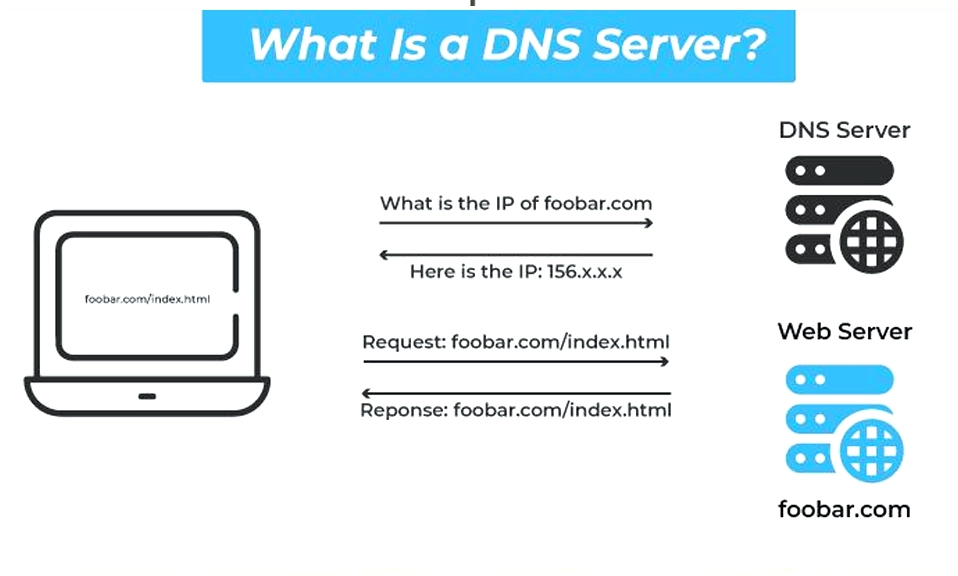
DNS does the exact same thing for the internet. It is a massive, global, decentralized directory that translates human-readable domain names (like
google.com or netflix.com) into machine-readable IP addresses (like 142.250.190.46).Without DNS, you would have to memorize the IP address of every single website you wanted to visit. The internet, as we know it, would be unusable.
🔄 2. How Does a DNS Lookup Work? (The 4-Step Journey)
When you hit “Enter” on a URL, a lightning-fast, multi-step conversation happens in milliseconds:
- The Request: Your computer asks your DNS Resolver (usually provided by your Internet Service Provider) for the IP address of the website.
- The Root Server: If the resolver doesn’t already know the answer (it’s not in its “cache”), it asks a Root Server, “Where can I find
.comaddresses?” - The TLD Server: The Root Server points the resolver to the Top-Level Domain (TLD) Server responsible for
.com. The TLD server then says, “I know who managesyoutube.com.” - The Authoritative Server: Finally, the resolver asks the website’s Authoritative Name Server for the exact IP address. The server provides it, the resolver gives it to your computer, and the website loads.
Note: To save time, your computer and your DNS resolver “remember” (cache) these IP addresses for a while, so the next time you visit, it skips steps 2, 3, and 4.
⚡ 3. How DNS Affects Your Internet Connection
You might be thinking, “This all happens in milliseconds. Why should I care?”
Because the quality of your DNS server directly impacts three critical aspects of your daily internet experience:
🏎️ A. Speed and Responsiveness
Every time you click a new link, a DNS lookup must occur. If your ISP’s DNS server is slow, overloaded, or geographically distant, that lookup might take 100–200 milliseconds instead of 10.
- The Effect: Websites feel “sluggish” to start loading, even if your actual download speed (bandwidth) is fast. Switching to a faster DNS provider can make browsing feel instantly snappier.
🛡️ B. Security and Privacy
By default, your ISP handles your DNS requests. This means your ISP can log every single website you visit, building a detailed profile of your browsing habits to sell to advertisers.
- The Effect: A lack of privacy. Furthermore, malicious actors can sometimes perform “DNS Spoofing,” redirecting you to a fake, phishing version of your bank’s website. Premium DNS services (like Cloudflare or Quad9) actively block known malicious domains and encrypt your DNS queries to protect your privacy.
🧱 C. Reliability and Uptime
If your ISP’s DNS server crashes or undergoes maintenance, you will get a “Server Not Found” or “DNS Probe Finished” error in your browser.
- The Effect: Your internet appears to be “down,” even though your router is working perfectly and the website you are trying to visit is fully operational. Using a highly reliable, global DNS provider prevents these frustrating, localized outages.
🌐 4. The Best Free DNS Providers (And Why to Use Them)
You are not forced to use your ISP’s default DNS. You can change it for free, and millions of people do. Here are the top contenders:
- Cloudflare (
1.1.1.1and1.0.0.1): Widely considered the fastest public DNS in the world. They also have a strict privacy policy, promising not to log your browsing data or sell it to advertisers. Google Public DNS (8.8.8.8and8.8.4.4): Extremely reliable, fast, and backed by Google’s massive global infrastructure. A solid, dependable choice. - Quad9 (
9.9.9.9): Focused heavily on security. It automatically blocks access to known malicious, phishing, or malware-hosting domains. - OpenDNS (by Cisco): Great for families. It offers robust, customizable content filtering to block adult content or specific categories of websites.
🛠️ 5. How to Change Your DNS (The Quick Way)
Changing your DNS is one of the highest-return, lowest-effort tweaks you can make. You can do it on individual devices, but the best method is to change it on your router. This protects every device in your house (phones, smart TVs, laptops) automatically.
- Log into your router’s admin panel (usually
192.168.1.1or192.168.0.1). - Look for WAN Settings, Internet Settings, or DNS Configuration.
- Change the setting from “Automatic” or “Get from ISP” to Manual.
- Enter the Primary and Secondary DNS addresses of your chosen provider (e.g.,
1.1.1.1and1.0.0.1). - Save the settings and restart your router.
A 5-Minute Upgrade for Your Entire Network
DNS is the invisible plumbing of the internet. Most of the time, it works perfectly, and we never think about it. But when it’s slow, unreliable, or privacy-invasive, it drags down your entire online experience.
By taking five minutes to switch your router’s DNS to a faster, more secure, and privacy-focused provider like Cloudflare or Quad9, you can make your internet feel faster, safer, and more reliable—all for absolutely free.
It’s the easiest tech upgrade you’ll make all year.