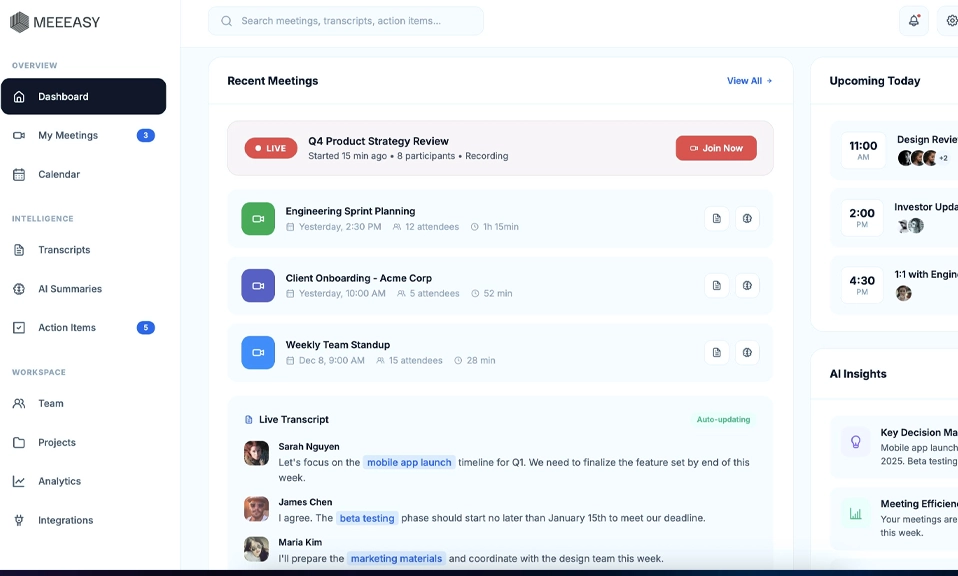
You know that moment in a meeting?
Someone says something important. You are typing frantically. You miss the next important thing because you were typing the last important thing. Then someone asks, “Can you send the notes?” And you send a messy doc with half sentences and three typos.
That was me for years. Until I stopped taking notes completely.
In 2026, you do not need to take meeting notes manually anymore. You just need the right AI app to do it for you. It listens, transcribes, summarizes, pulls out action items, and sends the notes before you have even stood up from your chair.
I tested the 10 best ones. Some are free. Some are for sales teams. Some are for students. Some never even join your call as a bot.
Here is the list that will actually save you hours every week.
How To Pick The Right One In 30 Seconds
Before the list, ask yourself one question:
Do you want notes for MEETINGS, or notes for EVERYTHING?
If it is meetings, pick 1 to 4, 9, or 10. If it is everything, your ideas, research, and life, pick 5 to 8.
Now, the top 10.
1. Fathom – Best Free Meeting Notes, Period
If you only try one app from this list, try this one.
For most small businesses, Fathom is the best place to start, because its free plan includes unlimited recordings, transcripts, and instant AI summaries.
Let me repeat that: Unlimited. Free. No minute counting. No credit card.
Fathom joins your Zoom, Google Meet, or Teams call as a bot, records it, transcribes it, and gives you a summary with action items in minutes. The free plan gives you unlimited recordings and transcripts, and advanced AI summaries on 5 calls a month. Premium is $16 a month billed annually.
It also has bot-free capture in beta on Mac, so you can record without a bot showing up.
Best for: Literally everyone. Freelancers, managers, students, founders. If you have meetings, start here.
Watch out for: Advanced summaries are capped at 5 per month on free. If you have 20 meetings a week, you will need Premium.
2. Otter.ai – Best For Live Transcription
Otter is the OG. It has been around the longest, and it still feels the most polished for live notes.
Otter.ai is best for live transcription you can follow during the call. You can see the words appear in real time, highlight them, add comments, and edit while the meeting is still happening.
It is also great for in-person meetings. Open the app on your phone, put it on the table, and it records and transcribes. No Zoom needed.
Free plan: 300 minutes a month, 30 minutes per conversation. Pro is from $8.33 per user a month on annual billing, but watch its minute and meeting-length caps. On monthly billing, it is $16.99 a month.
Best for: People who want to see the transcript live, teachers, journalists, and anyone who records in person.
Watch out for: The free plan caps you fast if you have long meetings.
3. Fireflies.ai – Best For Sales Teams and CRMs
If your meeting notes need to feed Salesforce or HubSpot, Fireflies is your app.
Fireflies is best for teams that want unlimited transcription on a free plan and CRM integrations at a low entry price.
It records, transcribes, summarizes, and then automatically pushes the notes, action items, and even talk-time analytics into your CRM. Your sales manager will love you.
Pricing: Free with unlimited transcription and limited AI summaries, 400 minutes team storage. Pro is $10 per seat a month, billed annually.
Best for: Sales teams, recruiters, agencies, and anyone who lives in a CRM.
Watch out for: The free plan gives you unlimited transcription but limited AI summaries. You will need Pro for the good summaries.
4. Granola – Best If You Hate Meeting Bots
This is my personal favorite for sensitive meetings.
Granola is the best AI note taker for people who hate meeting bots. It listens to your computer’s audio, so nobody sees a note taker join.
No bot joins your call. No “Granola is recording” message. No awkward “Is that a bot?” question from your client.
It takes your rough notes, your messy bullet points, and turns them into clean, full notes. It does not keep the audio, which is great for privacy.
The free plan keeps the last 30 days of notes. Business costs $14 per user a month.
Best for: Founders, executives, consultants, and anyone who has private or client meetings where a bot feels weird.
Watch out for: It does not store audio, so you cannot go back and listen. And it only shows 30 days of history on free.
5. Notion AI – Best All-In-One Workspace
Notion AI is not a meeting recorder. It is where your notes live after the meeting.
Notion AI wins for most people: notes, docs, and tasks live in one workspace, with the full AI tools on Business at $20 per member a month.
You can take notes, turn them into tasks, turn tasks into a project, and ask Notion AI, “What did we decide about the launch last week?” and it will search all your docs and answer.
What used to be a $10 per member a month add-on on any plan now requires the $20 per user a month Business tier for the full AI suite, including Notion Agent, AI search, and AI meeting notes.
Best for: Teams already on Notion, startups, content teams, and anyone who wants notes, docs, and tasks in one place.
Watch out for: It is $20 a person, which adds up fast for a big team. And it is not as good at live transcription as Fathom or Otter.
6. NotebookLM – Best For Research and Study, And It Is Free
Google’s NotebookLM is free and unmatched for research and study.
This is not a meeting app. It is a research superpower.
Upload 50 sources per notebook on the Standard plan, PDFs, articles, YouTube videos, your own notes. Then ask it questions, and it answers only from your sources, with citations. It will even turn your sources into a podcast-style Audio Overview with two AI voices discussing your documents.
NotebookLM is the best free pick and the best for turning a pile of sources into cited answers.
Best for: Students, researchers, lawyers, writers, and anyone drowning in PDFs.
Watch out for: It is web-only. No mobile app that feels great yet. And it is not for live meetings.
7. Obsidian – Best For Privacy and Owning Your Notes Forever
For personal notes and knowledge, Notion AI is the best all-rounder and Obsidian is the best free, private option.
Obsidian is different. Your notes are just plain text files on your computer. No cloud required. No subscription required. You own them forever.
Add AI plugins like Smart Connections or Copilot, and you can chat with your notes, link ideas automatically, and build a second brain that actually works.
Obsidian is the pick if you want your notes local, private, and yours forever, free for personal use with Sync from $4 a month.
Best for: Writers, developers, researchers, and privacy nerds who do not want their notes on someone else’s server.
Watch out for: It has a learning curve. It is powerful, but it is not plug-and-play like Notion.
8. Mem – Best For Fast Capture
Mem is the app for people who have ideas all day and forget them by night.
It is AI-first auto-organization. You dump a thought, a voice note, a link, a meeting note, and Mem organizes it, links it, and surfaces it when you need it. You can chat with your notes like you chat with ChatGPT.
Pricing: Free limited, Plus $9 a month, Pro $29 a month.
Best for: Solo creators, founders, and anyone who thinks in messy bursts.
Watch out for: Mem is web and iOS only. There is no desktop app or Android support. And it is not end-to-end encrypted.
9. MeetGeek – Best Affordable All-Rounder For Teams
MeetGeek is the quiet overachiever. It does almost everything Fathom does, but with more automations and workflows.
It joins your call, transcribes, summarizes, and can automatically send follow-ups, update your CRM, and share highlight reels with clients.
Free tier gives you 3 hours a month with transcripts deleted after 3 months. Pro at $9.99 per user a month bumps that to 20 hours with a year of transcript storage.
Best for: Small teams and consultants who want automations without paying $20 per person.
Watch out for: The free plan is small, only 3 hours. You will outgrow it fast if you have lots of meetings.
10. tl;dv – Best For Sharing Clips and Async Review
tl;dv is built for teams that do not want to attend every meeting.
It records unlimited meetings on free, with AI notes on 10 meetings. Paid plans start from $18 per user a month billed annually.
The killer feature: You can clip a 30-second moment from a meeting, “Watch this, this is what the client actually said,” and send it to your team on Slack. No one has to watch the full hour.
It also has great AI-powered meeting search. Type “pricing objection” and it finds every time someone talked about pricing in the last 3 months.
Best for: Remote teams, sales teams, and product teams who want to share moments, not full recordings.
Watch out for: The free plan limits AI notes, and pricing can be confusing.
Quick Comparison: Which One Should You Get?
If You Are… | Get This | Why |
|---|---|---|
Everyone, just start free | Fathom | Unlimited free recordings |
Live transcription lover | Otter.ai | See words in real time |
Sales team | Fireflies.ai | CRM integrations, $10 |
Hate bots | Granola | No bot joins, private |
Team already on Notion | Notion AI | Notes + docs + tasks |
Student / researcher | NotebookLM | Free, cited answers |
Privacy nerd | Obsidian | Local, free, yours forever |
Fast thinker | Mem | Capture and auto-organize |
Small team, low budget | MeetGeek | $9.99, automations |
Remote team | tl;dv | Share clips, async review |
3 Rules To Use AI Note-Takers Without Getting In Trouble
1. Tell people you are recording. Even if the app does not show a bot, say at the start: “I am using an AI note-taker so I can be present, is that okay?” It takes 5 seconds and avoids 99% of problems.
2. Never paste the raw transcript into Slack. Always check the AI summary first. AI makes mistakes. It will mishear names, numbers, and dates. Spend 2 minutes editing before you share.
3. Do not use a meeting recorder for confidential HR or legal meetings without permission. Some meetings should stay human-only. Use your judgment.
You do not need to be the person
typing while everyone else is talking anymore.
In 2026, the best note-taker is not you. It is an AI that listens better than you, remembers better than you, and never gets tired.
Start with Fathom if you want free. Start with Granola if you hate bots. Start with NotebookLM if you are a student. Start with Notion AI if you live in Notion.
Pick one. Use it for your next meeting. Then go back and look at the notes it made while you were actually present in the meeting.
You will never go back to manual notes again.