Imagine this.
You are on a plane to Nairobi, or in a cafe in Kampala, or stuck in a tiny apartment with no desk. You put on a pair of normal-looking glasses, and suddenly you have three huge monitors floating in front of you. No laptop screen. No desk. No 27-inch monitor to carry.
That is the promise of the XREAL Aura.
And it is not a concept video anymore. It is on sale right now.
So can a pair of 95-gram glasses really replace your computer screen? Let us be honest about what it does brilliantly, and where it still feels like a prototype.
What Is The XREAL Aura?
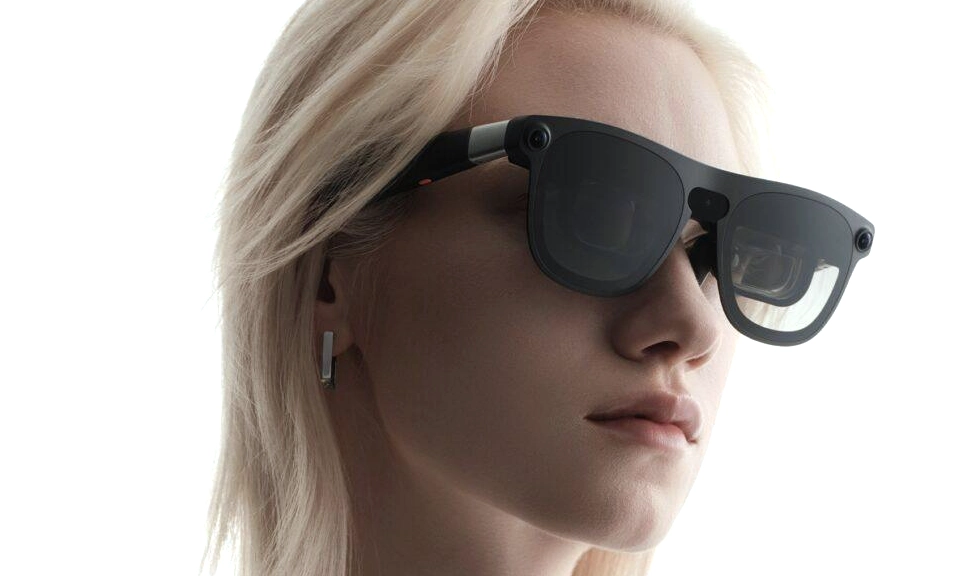
The XREAL Aura, unveiled at Google’s Android Developer Summit on October 28, 2026, introduces a new contender in the augmented reality space. Developed in collaboration with Google, these lightweight AR glasses run on the Android XR platform and feature advanced hardware like Sony micro OLED displays with a 120Hz refresh rate and a 70° field of view.
On October 28 (local time), Google and XREAL officially launched XREAL AURA, the first wired XR glasses running Android XR. Orders opened the same day in the United States, Canada and Korea, with Japan following on November 2; first shipments are due in mid-November.
Customers in those regions should be able to go hands-on with their XREAL AURA units in mid‑November. Everyone else will have to wait a bit longer, as additional markets are scheduled to roll out in 2027.
That last line matters if you are outside the US, Canada, Korea, or Japan. You will have to wait until 2027 for official rollout, or import it.
But here is why everyone is talking about it. It is not just display glasses like the old XREAL One. It is a full computer on your face.
AURA’s biggest feature is that apps run standalone without connecting to a smartphone or PC.
You do not need a phone. You do not need a laptop. The glasses + a small puck = a full Android XR computer.
The Specs That Actually Matter
Forget the marketing. Here is what you are actually getting:
What | XREAL Aura |
|---|---|
Weight | 95g glasses + 265g puck |
Display | Sony micro-OLED, 1920 x 1200 per eye, 120Hz |
Field of View | 70 degrees |
Chip | Snapdragon Reality Elite + Xreal X1S chip |
Battery | 4,455mAh, 3 to 5 hours depending on use |
Tracking | 6DoF, hand tracking, 3 cameras |
OS | Android XR + Gemini |
Dimming | 5 levels electrochromic dimming |
The XREAL Aura uses optical see-through lenses: you view your surroundings directly, with digital interfaces layered on top. Five levels of electrochromic dimming let users tune lens transparency.
In plain English: You can still see the real world. You are not blindfolded like in a VR headset. The glasses darken like sunglasses when you want the screen to pop, and go clear when you want to see your coffee.
The glasses use the company’s X Prism optics to deliver a 70‑degree field of view, paired with Sony micro‑OLED displays that run at 1920 × 1200 per eye.
70 degrees is huge for glasses. The older XREAL One Pro was only 57 degrees. This is much closer to a real monitor.
Price: Not Cheap, But Cheaper Than A Vision Pro
Here is the pricing, and yes, there is a launch discount:
- XREAL AURA 12GB + 256GB: $1,279, limited-time offer of $1,099 through December 2026
- XREAL AURA 16GB + 512GB: $1,499, limited-time offer of $1,299 through December 2026
XREAL Aura launched October 28, 2026, from $1,099; Meta VR Glasses arrive spring 2027 at $1,299.99.
You can pick up the 12GB + 256GB model for $1,099 through December. It usually costs $1,279. The ordinarily $1,499 16GB + 512GB variant costs $1,299 for the remainder of 2026. Shipping is expected to begin in the middle of November.
So $1,099 gets you the glasses, the puck, the computer, the displays, everything. No extra laptop needed.
Compare that to Apple Vision Pro at $3,499, or Samsung Galaxy XR at around $1,800 to $2,000, and suddenly Aura looks like the affordable spatial computer.
How It Actually Replaces Your Screen: 3 Modes
This is the part most reviews miss. Aura does not have one way to replace your monitor. It has three.
1. Standalone Mode: The Puck Is The Computer
You plug the glasses into the puck with a cable. The puck runs Android XR. You open Chrome, Google Docs, YouTube, Gmail, all as floating windows in the air.
Android XR includes Google Docs, Google apps, and Gemini built in. Reviewers found you can open five separate floating screens at once, including playing a virtual piano, doing a Google search, and playing games.
A young man with curly hair reviews the Xreal Aura glasses, which run on Android XR. He demonstrates looking through the glasses at five separate floating screens, including playing a virtual piano, doing a Google search, and playing games.
Imagine writing a document on one floating screen, having YouTube on another, and a WhatsApp-style chat on a third, all while still seeing your room. That is the dream.
2. PC Display Mode: Plug It Into Your Laptop
This is the mode most people will actually use for work.
Users can opt to plug a computer or handheld gaming console directly into the Xreal Aura via USB-C to make it an augmented display.
You can connect the glasses to a laptop and use Aura as an external display.
Using wired mirroring, it expands a laptop or handheld game device screen into a large display inside the glasses.
The lightweight 95-gram frames remain comfortable over long sessions, frame-mounted speakers produce clean audio, and mirroring a laptop screen alongside floating Android windows works smoothly. The glasses can also bypass the Compute Puck entirely: plugging the USB-C cable directly into a laptop or phone turns the glasses into a standard virtual monitor, producing a sharper text image than running the feed through the puck’s Android XR window.
That last point is key. For text, for Excel, for coding, direct USB-C mode is sharper than running through Android XR. Reviewers recommend using it as an extended display, not just mirroring.
The Aura can also serve as a display for other hardware. Connecting a MacBook, an iPhone, a Steam Deck, the new iPad Mini and even a Nintendo Switch 2 casts a virtual screen into the glasses.
One minute you are working on your MacBook. Next minute you are playing Switch 2 on a 150-inch virtual screen on a plane. Same glasses.
3. The Big Screen Mode: Your Cinema
The device is designed to replace traditional screens like monitors and tablets, offering practical applications such as virtual multi-monitor setups, immersive entertainment and AI-driven task management.
Forget the work stuff for a second. On a plane, in bed, in a hotel, you can watch Netflix on a screen that feels 10 feet wide, with no one seeing what you are watching. That is privacy + cinema.
That is why XREAL says Aura can replace your monitor. For many people, it can. For some people, it cannot yet. Let us be honest about both.
What It Does Brilliantly
1. It is actually wearable
Aura: 95 g glasses + 265 g puck, 3–4 hours battery; Meta: ∼100 g + ∼300 g puck, up to 3 hours playback.
95 grams is lighter than most sunglasses. You can wear these for 2 to 3 hours without your nose hurting, unlike a Vision Pro that feels like a brick on your face after 45 minutes.
2. The display is gorgeous
Sony micro OLED panels with a resolution of 1920×1200 pixels per eye and a 120Hz refresh rate, delivering sharp and fluid visuals.
Text is sharp. Colors pop. 120Hz makes scrolling feel buttery. In direct PC mode, reviewers say text is even sharper.
3. Gemini is actually useful
Cameras enable fixed-in-place windows and hand tracking, which worked much better in testing than it had in June. Gemini screen sharing can answer questions about an app or computer screen.
Gemini can, however, take in visual information using the on-device cameras, similar to Samsung and Google’s smart glasses.
A top arm button: one click opens the home app grid, a hold launches live Gemini.
Hold the button, ask “What is on this spreadsheet?” or “Summarize this article I am looking at,” and Gemini sees what you see.
4. 6DoF tracking actually works
To support spatial tracking, Xreal integrated two forward-facing cameras on the outer corners of the frame, capturing head motion in six degrees of freedom alongside hand tracking.
Three cameras are built in — two in the corners of the frame, one above the nose — handling room tracking, Gemini visual awareness and hand tracking.
Translation: You can pin a window to your wall, walk around, and it stays there. It does not follow your head like a cheap VR menu. That is what makes it feel like a real monitor.
Where It Still Feels Like A Prototype
Let us not hype this into something it is not. Every honest review says the same thing.
1. No eye tracking
Because the Aura omits internal eye tracking, navigation relies on outward-facing cameras interpreting hand gestures such as pointing, pinching, and dragging.
No eye tracking, unlike Apple Vision Pro, Samsung Galaxy XR and Meta VR Glasses; the processor puck warns of overheating in a pocket.
You have to pinch your fingers to click. You cannot just look at an app to select it. In bright light, it works. In low light, it gets shaky.
The most significant drawback of the Aura is its control system. Front cameras track hand movements, requiring users to pinch two fingers together to open apps or move windows.
Hand tracking is shaky sometimes.
2. Battery and heat
Xreal rates the internal battery for up to four hours of continuous runtime, exceeding the two to three hours typical of bulkier headsets.
The Aura is rated for up to five hours of productivity or closer to three hours of intensive use. In testing, the puck showed an overheating warning after about 15 minutes of intensive VR or AR gaming in a pocket; the 70° view was also too narrow for full VR immersion.
So for work, you get 4 to 5 hours. For gaming or heavy AR, you get 3 hours, and the puck gets hot if it is in your pocket. You can charge while you use it, but then you have another cable.
3. Field of view is good for glasses, not for VR
Cons: Limited field of view, Too much business, not enough play, Hand tracking is shaky sometimes.
The narrow field of view, the lack of eye tracking, the rough trackpad and the cable clutter all make the experience feel like a prototype.
70 degrees is amazing for glasses, but a VR headset is 90 to 110 degrees. If you want full VR immersion, Aura is not that. It is AR. You will still see the edges of the virtual screen.
Gemini can’t, for example, close all your tabs or adjust the tint of the lenses.
Android XR is still half-baked. Some apps are not optimized. Some features feel like a demo, not a finished product.
XREAL Aura vs The Competition: Who Should Buy What?
This is the question everyone asks.
If you want a simple big screen for your phone/laptop: Buy XREAL One Pro at $599.
Our verdict: the XREAL One Pro is the best virtual-screen glasses for most people at $599.
Xreal’s own One Pro display glasses sell at $599. Meta’s Ray-Ban Display, a small in-lens screen with a wrist band, is $799.
One Pro does one thing, a big virtual monitor, and does it perfectly, with no puck, no Android XR, no complexity.
If you want AI glasses you wear all day: Buy Meta Ray-Ban Display at $799.
Meta sells cameras and an assistant you wear out into the world; XREAL sells a private cinema screen you plug into a phone, laptop, or console.
Ray-Ban Meta has proven that millions of people will wear a camera and a microphone on their face if you hide the tech inside a pair of Wayfarers.
If you want a full computer on your face: Buy XREAL Aura at $1,099.
First Android XR glasses, $1,279 or $1,499, Own compute puck and apps, 95 g see-through glasses, Also works as a PC display.
Aura is the only one that is both a monitor and a computer. That is its superpower.
Who Should Actually Buy The Aura?
Buy it if you:
- Work remotely and travel a lot. Hotel + Aura = office with 3 monitors.
- Are a coder, writer, or analyst who lives in Chrome and Google Docs. Aura runs Android XR natively.
- Watch a lot of movies on planes or in bed and want privacy.
- Are a developer who wants to build for Android XR early. Google is giving early adopters a head start.
Do NOT buy it if you:
- Just want a big screen for Netflix. One Pro at $599 is better value.
- Need 8 hours of battery for a full workday without charging.
- Hate cables. Aura is wired. The glasses connect to the puck. The puck connects to power. There is cable clutter.
- Live outside the US, Canada, Korea, or Japan and do not want to import and wait for 2027 support.
Can It Replace Your Computer Screen?
Yes, for some people, right now. For most people, in 2 years.
For travel, for focused work, for movies, for a second monitor you can carry in your pocket, Aura is already better than a laptop screen.
The lightweight 95-gram frames remain comfortable over long sessions, and mirroring a laptop screen alongside floating Android windows works smoothly.
For a full 8-hour workday, for color-accurate design work, for full VR gaming, not yet. The battery, the hand tracking, and the 70-degree field of view hold it back.
But here is what matters: This is the first time Android XR has lived in glasses that look like glasses, not ski goggles.
Xreal Aura Review: It’s Almost Time to Turn the Page on VR Headsets… Almost.
That headline is perfect. Almost. Not quite. But almost.
And in tech, “almost” means the next version will be the one that changes everything.
If you buy Aura now, you are buying the future early, with all the rough edges that come with it. If you wait, you will get a cheaper, lighter, better version in 2027 or 2028.
Either way, the computer screen as we know it is dying. It just does not know it yet.