The dream of a personal AI assistant has always been tangled up in a single, frustrating question: do you need to learn how to code to build one? For years, the answer was essentially yes—or at least, you needed to be comfortable enough with APIs, authentication, and JSON to stitch something together. That barrier is gone. In 2026, the tools to build a genuinely useful, personalized AI assistant are visual, conversational, and designed for people who have never written a line of code in their lives.
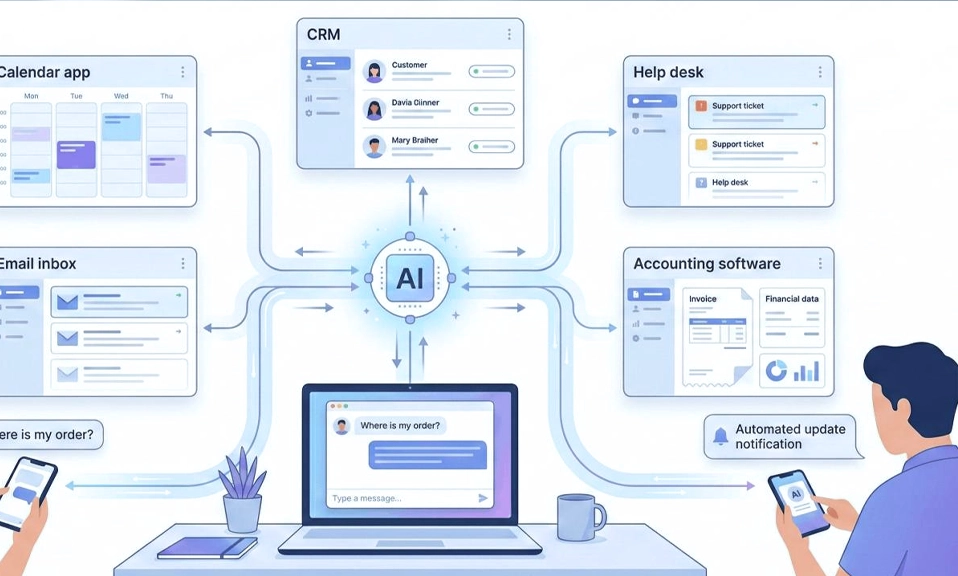
The shift is not just about ease of use. It is about a fundamental change in what these tools can do. The first generation of no-code AI was essentially a dressed-up chatbot—you uploaded some documents, it answered questions. The 2026 generation is different. Platforms like Lindy, Zapier Agents, LangSmith Agent Builder, and MindStudio can connect to your calendar, your email, your task list, and your other apps, then take actions on your behalf. They can schedule meetings, draft replies, summarize documents, and run on a schedule—all without you touching a single line of code. The question is no longer whether you can build a personal AI assistant without coding. It is which of the many paths you should take, and how to avoid the mistakes that turn a promising experiment into an abandoned project.
The Two Paths: Quick Configuration vs. Action-Oriented Agents
The no-code landscape has split into two distinct tiers, and understanding the difference is the first decision you need to make.
Path 1: Built-In Custom Assistants (30 Minutes to a Working Version)
The fastest route is to use the custom assistant features already built into the AI platforms you may already pay for. OpenAI’s GPT Builder lets you create a custom GPT inside ChatGPT: you name it, write instructions, upload reference documents, and it loads that configuration every time you open it. Google’s Gems works the same way inside Gemini, and Claude Projects lets you upload files and set project-level instructions that apply to every conversation in that project.
These tools are not full agents. They do not connect to external apps, they do not run on a schedule, and they cannot take actions like sending an email or updating a spreadsheet on their own. What they can do is carry context between sessions. Instead of explaining your role, your tone, and your reference material every time you start a new chat, the assistant already knows. For personal productivity, writing assistance, and research with specific source material, this is enough—and it takes about half an hour to set up.
The trade-off: limited customization and vendor lock-in. Your assistant lives inside one platform’s ecosystem, and if that platform changes its features or pricing, your assistant changes with it.
Path 2: No-Code Agent Builders (1 to 3 Hours to a Working Agent)
If you want an assistant that takes action—that sends emails, updates spreadsheets, checks calendars, pulls data from apps, or runs on a schedule—you need a no-code agent builder. This is where the market has exploded in 2026, and the platforms take genuinely different approaches.
Lindy is the most accessible of the action-oriented platforms. You describe what you want the agent to do in plain English, and Lindy builds the workflow. It can handle email triage, scheduling, CRM updates, meeting prep, and multi-step workflows across 1,500+ apps, and it works inside Slack, iMessage, and email. Lindy offers a 7-day free trial, then paid plans start at $49.99/month.
Zapier Agents extends Zapier’s massive integration library—9,000+ apps—with AI agents that can take on more responsibilities. Its Copilot feature lets you describe a workflow in plain language and have Zapier build the trigger and actions for you. The Zapier MCP lets external AI assistants discover and run actions across those connected apps.
LangSmith Agent Builder takes a different approach: there is no drag-and-drop canvas and no node library. You describe the agent’s goals and available tools in plain language, answer a few clarifying questions, and the Builder produces a functioning agent with memory and tool access. It is designed for people who know what the agent should do but not how to implement it in code.
MindStudio offers a visual, no-code editor that chains together AI models, data sources, and logic steps, with access to 200+ AI models and 1,000+ business applications—all without API keys.
Voiceflow is built for conversational agents, with a visual canvas for designing complex conversation flows, knowledge base integration, and deployment across chat and voice channels. It is particularly strong for customer experience and support use cases.
Chatbase is the simplest of the action-oriented tools: you upload your documents, paste your website URLs, or connect tools like Notion and Zendesk, and it creates a custom chatbot trained on your data. It is designed for non-technical users and supports 17+ large language models across OpenAI, Anthropic, and Google.
n8n sits at the more technical end of the no-code spectrum. It combines a visual canvas with optional JavaScript and Python, connects to 1,500+ integrations, and has a built-in MCP server that lets AI clients run and edit workflows. It is more powerful and more flexible than the others, but the learning curve is steeper.
| Platform | Best For | Time to First Version | Free Tier? |
|---|---|---|---|
| Custom GPTs / Gems / Claude Projects | Personal productivity, writing, research | ~30 minutes | Yes (within existing subscription) |
| Lindy | Action-oriented agents, email, scheduling, CRM | ~1–3 hours | 7-day trial |
| Zapier Agents | Broad app connectivity, workflow automation | ~1–3 hours | Limited free tier |
| LangSmith Agent Builder | Plain-language agent creation with memory | ~30–60 minutes | Free tier available |
| MindStudio | Visual agent building, multi-model access | ~1–2 hours | Free tier available |
| Voiceflow | Conversational agents, CX and support | ~2–4 hours | Free plan available |
| Chatbase | Document-trained Q&A assistants | ~15–30 minutes | Free plan available |
| n8n | Flexible, self-hostable automation with AI | ~3–5 hours | Self-hosted free |
Sources: Sentisight, MintedBrain, Lindy, Zapier, LangSmith, MindStudio, Voiceflow, Chatbase, n8n
The Step-by-Step Process (That Actually Works)
Regardless of which platform you choose, the process follows the same seven steps. The difference between an assistant that works and one that sits unused is almost always in steps 3 and 4.
Step 1: Pick One Concrete Use Case
Do not start with a general-purpose companion. Start with a single, repetitive task that drains time without requiring deep judgment. Answering recurring email patterns, summarizing long PDFs, organizing research notes, drafting social captions, or tagging leads in a CRM are all good first projects. Write the use case in one sentence: “An assistant that reads incoming client emails and drafts replies in my voice, flagging anything that needs my personal attention.” That sentence becomes the specification for everything that follows.
Step 2: Choose Your Platform
If your assistant only needs to follow instructions and reference documents, a custom GPT, Gem, or Claude Project is enough. If it needs to take action across apps, choose an agent builder. Lindy and Zapier are the easiest entry points for action-oriented agents. LangSmith is the fastest for plain-language agent creation. MindStudio is the most visual. Voiceflow is the most conversational. n8n is the most flexible, if you are willing to invest the learning time.
Step 3: Write the Instructions Like You’re Onboarding a New Hire
This is the step most people rush, and it is the step that determines whether the assistant is useful. Vague instructions produce generic output. A workable template includes:
Role: “You are my weekly planning assistant. You help me prioritize tasks and manage my time.”
Context: “I work in marketing. My peak focus hours are 9 AM to 12 PM. I prefer to batch meetings in the afternoon.”
Format: “Output a numbered priority list. Group tasks by project. Flag any scheduling conflicts.”
Constraints: “Keep the weekly plan under 500 words. Do not schedule tasks during lunch (12 to 1 PM).”
Constraints matter as much as instructions. Tell the assistant when to ask rather than guess, what topics to refuse, and how to handle uncertainty. A good prompt is not a wish list—it is an operating manual.
Step 4: Build the Knowledge Base (Quality Over Volume)
An assistant with no context produces the same generic output as the underlying model. Upload five to ten high-quality documents that show the assistant how you think and write: past emails that demonstrate your voice, a brand or style guide, FAQs, sample reports, onboarding scripts, and any reference data the assistant will need to look up. Quality matters more than volume. Twenty messy files produce worse results than five clean ones.
For assistants that need to recall facts from large documents, the standard architecture is Retrieval-Augmented Generation (RAG) . Documents are split into chunks, embedded as vectors, and stored in a vector database. When a question comes in, the system retrieves the closest matching chunks and feeds them to the model along with the prompt. Most no-code platforms handle this for you—you upload the documents, and the platform does the chunking and retrieval. You do not need to understand the architecture to benefit from it.
Step 5: Test Against Real Work Before Connecting Anything
Before you connect the assistant to anything that sends, posts, or pays, run it manually for a week on actual tasks. Hand it three to five jobs you would otherwise do yourself. Check whether the output is on-brand, accurate, and genuinely faster than doing the work directly. If the answer is no on any of those, adjust the prompt or upload better examples before scaling up.
Most people need three to five rounds of refinement before the output matches their expectations. This is normal. The instructions get better as you discover edge cases.
Step 6: Connect Only the Tools the Assistant Actually Needs
Once the assistant produces reliable output, integrate it with the apps you actually use. But be deliberate about permissions. A weekly planning assistant needs calendar access. It does not need access to your entire email inbox. Start with low-risk integrations—calendar and task lists—before connecting email, file storage, or CRM access, which contain client data and confidential business information. Read the platform’s privacy policy and data handling practices before connecting sensitive accounts, and check whether your organization allows third-party AI tools to access corporate accounts.
Step 7: Expand Gradually, One Assistant at a Time
Once your first assistant works, do not try to make it do everything. Build a second assistant for a different job. A meeting prep assistant that pulls agendas and summarizes recent correspondence. An email drafter that generates reply options in your voice. A research summarizer that produces structured summaries of articles and reports. A content repurposer that turns one blog post into social posts, a newsletter section, and talking points. Specialized assistants outperform generalists because their instructions stay focused.
The Common Mistakes (and How to Avoid Them)
Vague instructions. “Be helpful” tells the assistant nothing. “Respond in three bullet points using data from the uploaded pricing sheet” tells it exactly what to do.
No constraints. An assistant without limits will invent calendar entries, quote prices that are not in your reference material, or make commitments you did not authorize. Tell it when to ask rather than guess, and what it must never do.
Too much data, too little quality. Twenty messy files produce worse results than five clean ones. Curate your knowledge base ruthlessly.
Connecting everything at once. Start with calendar and tasks. Add email and file storage only after the assistant has proven reliable on low-stakes tasks.
Expecting a single assistant to do everything. A generalist assistant with a sprawling instruction set will underperform a set of focused specialists. Build a small team of narrow assistants, not one overwhelmed generalist.
Start Small, Ship Fast, Refine Ruthlessly
Building a personal AI assistant without code in 2026 is not a technical challenge. It is a design challenge. The tools are there—Custom GPTs and Gems for configuration, Lindy and Zapier for action, LangSmith for plain-language agent creation, MindStudio for visual building, Chatbase for document-trained Q&A, and n8n for flexible automation. What separates a useful assistant from an abandoned experiment is the discipline to start with one concrete use case, write clear instructions with real constraints, upload five to ten high-quality reference documents, test against real work for a week, and connect only what the assistant actually needs.
You do not need to learn to code. You need to learn to brief—to describe a job so precisely that a machine can do it well. That is a skill anyone can develop, and it is the skill that turns a no-code tool into a genuine personal assistant. Start with one task that drains your time. Build a narrow assistant to handle it. Give it a week of real work. If it earns its place, build the next one. The stack grows from there—not from a single, all-knowing assistant, but from a small team of focused ones that each do one thing well.