You have outgrown shared hosting.
Your site is slow. It crashes when you get a spike. Your host tells you, “Time to upgrade.”
Then you see two options: Cloud Hosting and VPS Hosting.
They sound the same. They are priced almost the same. And every host tells you theirs is better.
So which one should you actually choose in 2026?
Here is the truth most hosting companies will not tell you: For most people, the right answer is not about speed. It is about how your traffic behaves.
Let me explain it in a way you will never forget.
The Simple Analogy
Think of hosting like housing.
Shared hosting is a hostel dorm. You share everything with strangers. If one person snores, everyone suffers.
VPS hosting is your own apartment. You have your own kitchen, your own bathroom, your own space. Nobody can steal your resources. But if your apartment building loses power, you lose power too. And if you want a bigger apartment, you have to move.
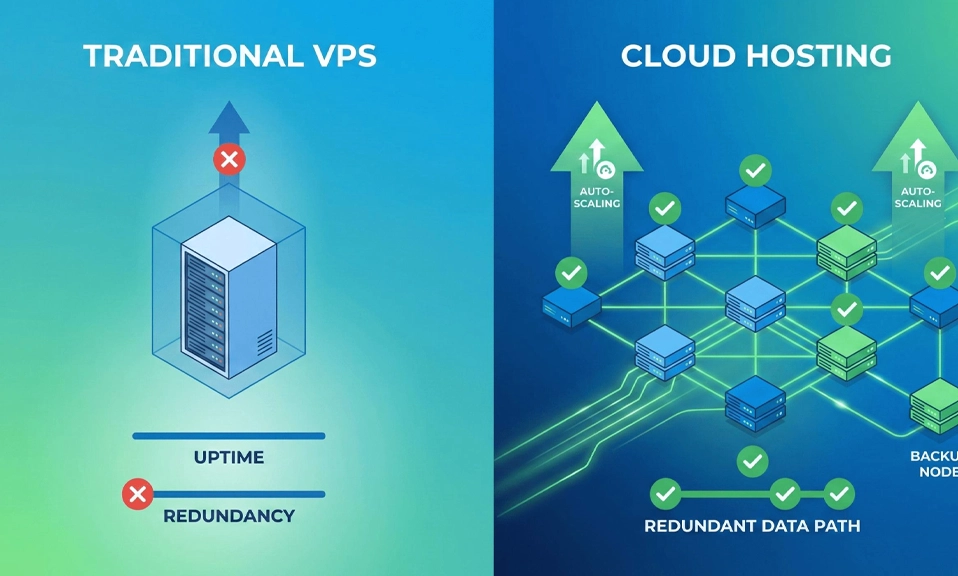
Cloud hosting is a whole city power grid. Your site does not live on one server. It lives on many servers connected together. If one server dies, another one takes over instantly. If you suddenly need more power, the grid gives it to you automatically. You pay for what you use.
That is the core difference.
What Is VPS Hosting?
VPS stands for Virtual Private Server.
Your host takes one powerful physical server and splits it into smaller virtual servers using virtualization. Each VPS gets its own dedicated slice of CPU, RAM, and storage.
VPS performance is consistent and predictable. Your resource allocation is fixed and dedicated, you know exactly what CPU, RAM, and storage you have, and those resources are reserved for you.
VPS hosting delivers consistent performance for predictable workloads. Your allocated CPU cores, RAM, and storage stay dedicated.
That is why VPS feels so stable. You know exactly what you bought. No noisy neighbor can steal it.
The downside? You are still on one physical machine. If you outgrow your plan, you have to upgrade manually. And that upgrade often means downtime.
What Is Cloud Hosting?
Cloud hosting does not live on one server. It lives on a network of servers.
Your website’s files are spread across many machines. If one machine fails, another one picks up the load. If you get a sudden traffic spike, the cloud adds more resources automatically.
Cloud hosting provides better performance, especially for high-traffic or unpredictable workloads.
Cloud hosting scales resources instantly on demand, VPS requires manual upgrades and temporary downtime.
That is the superpower of cloud. It does not panic when you go viral.
The downside? Pricing can be confusing. You pay for what you use, so a viral month can mean a bigger bill.
Cloud vs VPS: The 6 Key Differences
Factor | VPS Hosting | Cloud Hosting |
|---|---|---|
Typical price | $5 to $30/mo, fixed | $10 to $50/mo, variable |
Performance | Strong and stable | Strongest under spikes |
Scalability | Manual upgrade | Instant, often automatic |
Pricing Model | Pay-as-you-go, usage-based for cloud, Fixed monthly fee for VPS | Pay-as-you-go, usage-based |
Control | Full root access, you manage it | Depends, often managed for you |
Reliability | Good, but one server = one point of failure | Excellent, many servers back each other up |
Let me break each one down, because the table alone will not help you choose.
1. Performance: VPS Wins For Steady Traffic, Cloud Wins For Spikes
This is the most misunderstood part.
For raw single-server performance, VPS and cloud are comparable. For resilience to hardware failures, cloud has an architectural edge.
And 2026 benchmark tests reveal clear patterns. Properly configured 4-core VPS instances often outperform equivalent cloud setups by 15 to 25% for sustained workloads.
Why? Because a VPS gives you dedicated resources that never move. A cloud setup sometimes has to move your site between servers to balance load. That movement costs a tiny bit of speed.
But, cloud hosting excels during traffic spikes. Auto-scaling provisions additional resources within minutes.
So here is the rule:
- If your traffic is steady every day, like a business site with 500 visitors a day, VPS will be a bit faster and cheaper.
- If your traffic is spiky, like a blog post that goes viral, a store during Black Friday, or a news site, cloud will save you from crashing.
2. Scalability: This Is Where Cloud Crushes VPS
Scalability is instant, near-limitless scaling for cloud, manual scaling, limited by hardware for VPS.
With VPS, scaling is manual. You have to log in, pick a bigger plan, reboot the server, and hope it works. That takes time. And during that time, your site is slow or down.
With cloud, resources scale up or down on demand and pricing is typically flat for reserved plans or pay-per-use for elastic hyperscaler tiers.
Scalability for cloud is high scalability with the ability to scale resources up and down on-demand, while VPS is limited scalability, with the option to upgrade to a larger server or add more resources.
If you run a store and you are about to launch a product, you do not want to be stuck on a VPS that cannot handle the launch. Cloud will just grow with you.
3. Pricing: VPS Is Predictable, Cloud Can Surprise You
VPS pricing stays simple.
Pricing Model for cloud is pay-as-you-go, usage-based, while VPS is fixed monthly fee.
And starting price for VPS is from $4 a month, while cloud is from $5 to $10 a month, with AWS, GCP, Azure much higher.
VPS is like rent. You pay $20 a month, every month. You know your bill.
Cloud is like electricity. You pay for what you use. If you use more, you pay more. If you use less, you pay less. That sounds fair, until you get a $300 bill because a bot attacked your site.
For most beginners, predictable pricing wins. You do not want a surprise bill.
That is why managed cloud providers like Cloudways are so popular. They give you cloud power, but with fixed monthly pricing.
4. Control: VPS Gives You The Keys
If you are a developer, you will love VPS.
You get full root access. You can install anything. You can configure the server exactly how you want it. You can run Docker, custom PHP versions, Node.js, anything.
Cloud hosting, especially managed cloud, is more hands-off. You do not get to touch the server. The host manages it for you. That is great if you hate server admin, but frustrating if you love it.
Ask yourself: Do I want to be a sysadmin, or do I want to run my business?
If you love tinkering, VPS is for you. If you hate tinkering, managed cloud is for you.
5. Security And Isolation
Both are much better than shared hosting.
VPS gives you isolation. Your site is separate from other sites on the same physical server. If another site gets hacked, yours is not automatically hacked too.
Cloud gives you isolation plus redundancy. If one data center goes down, your site can be served from another one. That is why banks and big e-commerce stores use cloud.
For a normal site, both are secure enough. For a store that handles payments, cloud has a small edge because of that redundancy.
6. Who Manages It? Managed vs Unmanaged
This is the hidden cost nobody talks about.
Entry-level VPS plans start from as little as £3 to £6 a month for basic configurations, with managed plans typically starting at £20 to £40 a month.
Unmanaged VPS is cheap, but you are the IT department. You have to update the server, fix security patches, handle backups, and restart it when it crashes at 3am.
Managed VPS or managed cloud is more expensive, but someone else does all that for you.
If you are not technical, never buy an unmanaged VPS. You will save $10 a month and lose 10 hours a week.
Real Pricing In 2026: What You Will Actually Pay
Here are the real starting prices I found for 2026:
Best VPS Hosting:
- Hostinger VPS: Best value VPS hosting. Hostinger is $6.49 a month, renews at $11.99 a month, self-managed. Hostinger VPS is dev-friendly budget at $5.99 a month, with no managed option, KVM. On 25 October 2026, Hostinger’s KVM 2 plan gave you 8 GB of RAM for $8.79 a month on a two-year term.
- DigitalOcean: Best VPS hosting for developers. DigitalOcean is $4 a month, billed per second, unmanaged. DigitalOcean is $6 a month, $6 a month, monthly. It is the developer favorite.
- Vultr, Linode, Hetzner: All around $4 to $6 a month for an entry droplet, all unmanaged.
Best Cloud Hosting:
- Cloudways: Best managed WordPress cloud. Cloudways is $11 a month, billed hourly, fully managed. Pricing started around $11 a month for a 1GB DigitalOcean server in August 2026 and scales in step with the machine you choose. Cloudways at $14 a month is also listed as managed across clouds, and it is a managed layer over five different cloud providers. You can pick DigitalOcean, AWS, or Google Cloud underneath, but Cloudways manages it.
- Hostinger Cloud Startup: Budget Pick. Hostinger Cloud Startup offers genuine cloud features, dedicated resources, staging environments, starting at $9.99 a month. Just know it renews at $19.99 a month, that is the real price.
- AWS, Google Cloud, Azure: Powerful, but complex and expensive. You can easily pay $50 to $300 a month if you do not know what you are doing. Not for beginners.
So the cheapest way to start is VPS at $4 to $6 a month. The easiest way to start is managed cloud at $11 to $14 a month.
So, Which One Should YOU Choose?
Do not pick based on specs. Pick based on your situation.
Choose VPS Hosting if:
- Your traffic is steady and predictable
- You want the same bill every month
- You want full root access and control
- You are a developer or you have a developer
- You run 1 to 5 sites that do not spike wildly
- You want the best performance per dollar for steady work
Choose Cloud Hosting if:
- Your traffic spikes, goes viral, or is seasonal
- You run an e-commerce store, especially during Black Friday or product launches
- You cannot afford downtime, even for 10 minutes
- You want auto-scaling without touching the server
- You run many sites for clients and need to scale them independently
- You hate server admin and want it managed for you
Choose Managed Cloud, like Cloudways, if:
- You want cloud power but you do not want to be a sysadmin
- You want fixed pricing, not surprise pay-as-you-go bills
- You run WordPress sites for clients
My Recommendation For 2026
If you are reading this and you are still on shared hosting, here is what I would do:
If you are a beginner blogger or small business: Go with Hostinger Cloud Startup at $9.99 a month. You get cloud features, dedicated resources, and it is still easy. It renews at $19.99, but by then your site should be making money.
If you are a developer or you love control: Go with DigitalOcean at $6 a month or Hostinger VPS at $5.99 to $6.49 a month. You get full control, low price, and great performance for steady traffic.
If you run a growing business or agency: Go with Cloudways at $11 to $14 a month. It is managed cloud. You get the scalability of cloud without the sysadmin headache. It is the best middle ground in 2026.
If you run a store that cannot go down: Go with Cloudways on Google Cloud or AWS, or Hostinger Cloud. Do not risk a VPS that can go down when one server fails.
The worst choice is to stay on shared hosting and hope your site does not crash. The second worst choice is to buy an unmanaged VPS when you do not know how to manage a server.
Pick the one that matches your traffic, your skills, and your tolerance for downtime.
VPS is your own apartment
. Predictable, private, powerful, and cheaper for steady work.
Cloud is the city power grid. Flexible, resilient, auto-scaling, and unbeatable when traffic spikes.
For raw single-server performance, VPS and cloud are comparable. For resilience, cloud wins.
In 2026, you do not have to choose between cheap and reliable anymore. You can get VPS for $4 a month, or managed cloud for $11 a month. Both are miles better than shared hosting.
So, do not overthink it. Upgrade this week. Your site, your readers, and your Google rankings will thank you.