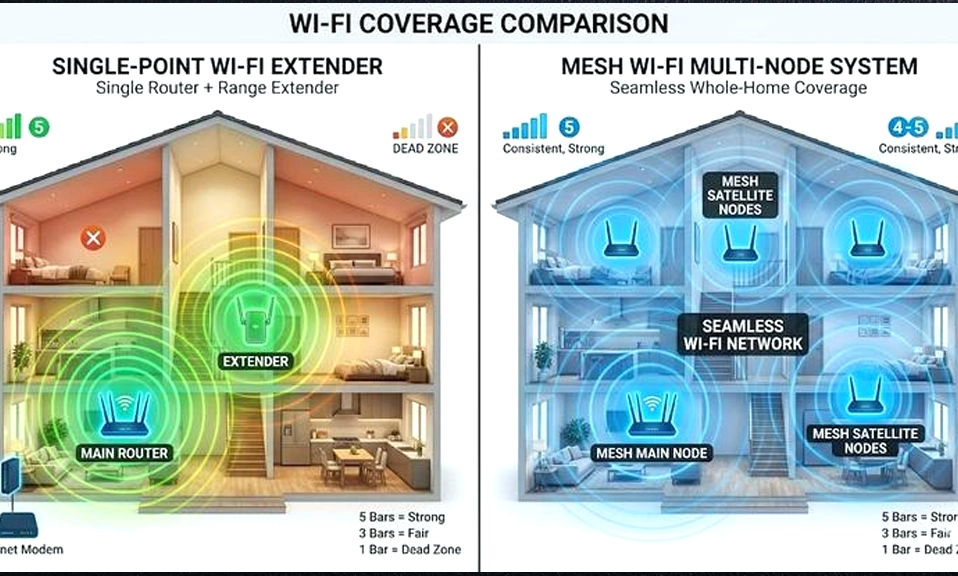
We’ve all experienced the “Wi-Fi Walk of Shame.” You’re streaming a movie in the living room with flawless 4K quality. You get up, walk down the hall to your bedroom, and suddenly, the video buffers. You check your phone: one bar. You step into the bathroom, and you’re completely offline.
Welcome to the Wi-Fi dead zone.
When your main router can’t cover your entire home, you generally have two options to fix it: buy a Wi-Fi Extender or upgrade to a Mesh Wi-Fi System.
Both promise to banish dead zones, but they do it in completely different ways, at vastly different price points, and with very different results. If you’re tired of the buffering and want to know which solution is actually worth your money, you’re in the right place.
Let’s break down the ultimate showdown: Wi-Fi Extender vs. Mesh Wi-Fi.
📡 Contender 1: The Wi-Fi Extender (The Budget Band-Aid)
How it works: A Wi-Fi extender (or repeater) acts like a digital megaphone. It plugs into a wall outlet halfway between your router and the dead zone, catches the existing Wi-Fi signal, and rebroadcasts it further into your home.
The Pros:
- Cheap: You can find decent extenders for $30 to $60.
- Easy to set up: Most plug directly into the wall and have a simple “WPS” button or a quick mobile app setup.
- Good for targeted fixes: If you have one specific dead zone (like a home office at the far end of the house), an extender can patch that single hole.
The Cons:
- The “Half-Speed” Penalty: Traditional single-band extenders have to receive the signal from your router and then re-transmit it to your device. Because they can’t do both at the exact same time on the same radio, they effectively cut your Wi-Fi speed in half.
- The “Network Name” Annoyance: Extenders usually create a separate network (e.g.,
MyWiFiandMyWiFi_EXT). Your phone won’t automatically switch between them. You have to manually go into your settings and change networks when you walk from the living room to the bedroom. - Amplifies Bad Signals: If you place the extender too far from the main router, it will just catch a weak, garbled signal and loudly broadcast a weak, garbled signal.
🕸️ Contender 2: Mesh Wi-Fi (The Whole-Home Overhaul)
How it works: A Mesh Wi-Fi system replaces your single router with a “system” of two or more devices (called nodes). One node connects to your modem, and the others are placed around your house. Unlike extenders, these nodes talk to each other intelligently, creating a single, seamless blanket of Wi-Fi coverage.
The Pros:
- Seamless Roaming: The entire system broadcasts under one single network name. As you walk through your house, the system automatically and instantly hands your phone off to the node with the strongest signal. No manual switching, no dropped video calls.
- Consistent Speeds: High-quality mesh systems (especially tri-band Wi-Fi 6 or 6E models) use a dedicated radio band just for the nodes to talk to each other. This means your devices don’t suffer the “half-speed” penalty.
- Smart Management: Mesh systems are managed via beautiful, user-friendly mobile apps that let you pause the internet for the kids, prioritize your work laptop, and run speed tests from anywhere.
- Scalable: Need more coverage? Just buy another node and plug it in.
The Cons:
- Price: A good 2-pack or 3-pack mesh system (like Eero, Google Nest Wifi, or TP-Link Deco) will cost anywhere from $150 to $400+.
- Overkill for small spaces: If you live in a 600-square-foot apartment, a mesh system is a waste of money.
⚔️ Head-to-Head Breakdown
Feature | Wi-Fi Extender | Mesh Wi-Fi System |
|---|---|---|
Price | $30 – $80 | $150 – $500+ |
Setup | Very Easy | Easy (App-guided) |
Network Name | Creates a separate, annoying network | One seamless network everywhere |
Speed Impact | Often cuts speed by 50% | Minimal to no speed loss (on good models) |
Best For | One specific dead zone on a budget | Whole-home coverage, multi-story houses |
🏆 The Verdict: Which Should You Choose?
The truth is, Mesh Wi-Fi is objectively the superior technology. It solves the fundamental flaws of the traditional extender. However, “better” doesn’t always mean it’s the right choice for your specific situation.
Choose a Wi-Fi Extender IF:
- You are on a strict budget.
- You only have one specific dead zone (e.g., the Wi-Fi is great everywhere except the garage or one back bedroom).
- You are renting and want a cheap, temporary fix that you can easily unplug and take with you.
- Pro Tip: If you buy an extender, look for a “Dual-Band” or “Tri-Band” model to minimize the speed loss, and place it exactly halfway between the router and the dead zone.
Choose a Mesh Wi-Fi System IF:
- You have a large home, a multi-story house, or thick walls (like brick or concrete) that block signals.
- You are tired of manually switching between
WiFiandWiFi_EXTon your phone. - You have a lot of smart home devices, multiple 4K streamers, and people working from home simultaneously.
- You want a “set it and forget it” solution that just works beautifully everywhere.
Stop Settling for Dead Zones
For years, Wi-Fi extenders were the only affordable way to push a signal further, and we all just accepted their flaws: the speed drops, the clunky network names, the constant reconnecting.
But in 2026, Mesh Wi-Fi prices have dropped significantly, making whole-home coverage accessible to the average household. If you have the budget, upgrading to a Mesh system is one of the most satisfying tech purchases you can make. It’s like upgrading from a single, flickering lightbulb to a fully illuminated, modern home.
But if you just need a quick, cheap patch for one stubborn corner of your house, a $40 extender will still get the job done.
Know your home, know your budget, and choose the tool that actually solves your problem.