The average drawer in the average home contains at least one old Android phone. It is too slow for daily use, the battery is degraded, and the screen may be cracked. But it is also a fully functional computer with a camera, GPS, Wi-Fi, Bluetooth, and a touchscreen—and throwing it away is a waste of hardware that can still do genuinely useful things.
The environmental case alone is compelling. Electronic waste is one of the fastest-growing waste streams in the world, and smartphones are among the most resource-intensive products ever manufactured. Extending the life of a device by even a few years reduces the demand for new mining, new manufacturing, and new shipping. But the practical case is just as strong: an old phone can become a dedicated device that does one job better than a general-purpose machine, and it costs nothing but a little time and creativity.
Here are ten clever ways to turn your old Android phone into a useful gadget.
1. A Dedicated Car GPS Unit
Old phones make excellent dedicated navigation devices. Install Google Maps or Waze, download offline maps for your region, and mount the phone on your dashboard. You can keep it permanently in the car, connected to a charger, and use it for navigation without draining your main phone’s battery or data plan.
The advantages are real: a dedicated GPS unit does not interrupt your main phone with calls or notifications, and it can be left in the car without worrying about it being your primary device. You can also pair it with a cheap prepaid SIM or use it offline entirely with downloaded maps.
What you need: A car mount, a charger, and a navigation app. Download offline maps in advance for areas with poor signal.
2. A Security Camera or Baby Monitor
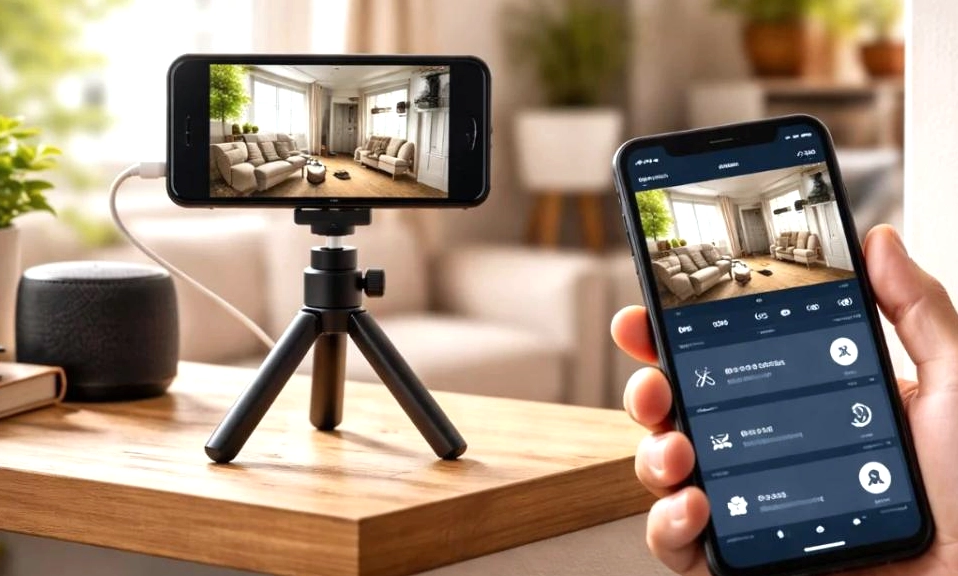
An old phone has a camera, Wi-Fi, and a screen—everything you need for a basic security camera. Apps like Alfred Camera, IP Webcam, and Manything turn an old Android device into a motion-detecting, night-vision-capable security camera that streams to your main phone.
Set it up facing a door, a driveway, or a pet’s crate. You can receive motion alerts, view live footage, and even use two-way audio. The same setup works as a baby monitor or a pet cam.
What you need: A stable Wi-Fi connection, a power source, and a monitoring app. A cheap phone tripod or mount helps.
3. A Digital Photo Frame
Old phones have beautiful screens—often OLED panels with excellent color accuracy—and they are ideal for displaying photos. Apps like Fotoo and Dayframe turn an old Android device into a digital photo frame that cycles through your favorite images, connects to cloud services like Google Photos, and can even display weather and time.
Mount it on a wall, prop it on a shelf, or place it on a bedside table. It is a far more personal display than a generic digital frame, and it costs nothing if you already have the phone.
What you need: A photo frame app, a charger, and a stand or wall mount. Set the screen to stay on while charging.
4. A Universal Remote Control
Most modern Android phones have infrared (IR) blasters—a feature that has largely disappeared from flagship devices but remains common on older phones. If yours has one, apps like Mi Remote and Universal TV Remote can turn it into a universal remote for your TV, air conditioner, soundbar, and other appliances.
Even without an IR blaster, you can use Wi-Fi-based remote apps for smart TVs, streaming boxes, and smart home devices. An old phone dedicated to this purpose means you never have to hunt for the remote again.
What you need: An IR blaster (check your phone’s specs) or a Wi-Fi-connected TV, plus a remote app.
5. A Portable Media Player
An old phone is a perfectly capable music player, podcast device, and video streamer. Load it with your favorite albums, download podcasts and audiobooks, and keep it connected to a Bluetooth speaker or wired headphones. It becomes a dedicated entertainment device that does not compete with your main phone for battery or storage.
You can also use it as a media server by installing apps like Plex or Jellyfin, turning it into a streaming hub for your home network.
What you need: A microSD card for storage, a media player app, and a speaker or headphones.
6. A Dashcam
Old phones can be repurposed as dashcams using apps like AutoGuard and DailyRoads Voyager. These apps record video continuously while you drive, overwrite old footage when storage fills up, and can even detect impacts and save the relevant clip automatically.
A dedicated dashcam phone means you do not have to mount and unmount your main phone every time you get in the car. Pair it with a cheap car mount and a charger, and you have a functional dashcam for almost nothing.
What you need: A car mount, a charger, a dashcam app, and a microSD card for storage.
7. A Smart Home Controller
If you have smart home devices—lights, plugs, thermostats, cameras—an old phone can become a permanent wall-mounted controller. Apps like Google Home, SmartThings, and Home Assistant can run on the device, giving you a dedicated interface for controlling your home without pulling out your main phone.
Mount it on a wall in a central location, keep it plugged in, and set it to stay awake. It becomes a touchscreen control panel that is always available.
What you need: A wall mount, a charger, and a smart home app compatible with your devices.
8. An E-Reader
Old phones are excellent e-readers. The screen is bright, the battery lasts for days when used only for reading, and apps like Kindle, Kobo, and Libby give you access to millions of books. You can also use Moon+ Reader or ReadEra for local files.
A dedicated e-reader phone means you can read without distraction—no notifications, no social media, no temptation to check email. It is a surprisingly effective way to reclaim reading time.
What you need: An e-reader app and a comfortable reading position. A blue-light filter app can reduce eye strain.
9. A Fitness Tracker or Sleep Monitor
Old phones have accelerometers, gyroscopes, and sometimes heart-rate sensors. Apps like Sleep as Android and Google Fit can turn an old phone into a sleep tracker, step counter, or workout companion. Place it on your mattress to track sleep cycles, or keep it in your pocket during workouts.
It is not as elegant as a dedicated wearable, but it is free and surprisingly accurate for basic tracking.
What you need: A fitness or sleep-tracking app and a place to mount or carry the phone.
10. An Emergency Backup Phone
The simplest and most obvious use: keep an old phone as a backup in case your main device is lost, stolen, or broken. Charge it periodically, keep a spare SIM or eSIM profile active, and store essential contacts and apps on it. In an emergency, a working phone—even an old one—can be a lifeline.
You can also use it as a travel phone for trips where you do not want to risk your main device, or as a kids’ phone for younger family members.
What you need: A charger, a spare SIM (optional), and a safe place to store it.
An old Android phone
is not obsolete. It is a versatile, capable computer that can be repurposed into a dedicated device for navigation, security, entertainment, reading, or home automation. The best part is that these projects are low-risk: if something does not work, you have lost nothing but a little time.
Before you throw your old phone away, try one of these ideas. Pick the one that solves a problem you actually have—a cluttered car dashboard, a worry about home security, a desire to read more—and see how far a device you already own can take you. The hardware is already there. All it needs is a new purpose.