You want to watch a show that’s geo-blocked in your country. Or maybe you’re sitting in a coffee shop and want to make sure nobody is snooping on your browsing.
You do a quick search and two solutions immediately pop up: VPNs and Proxy Servers.
At first glance, they seem to do the exact same thing: they hide your real IP address and make it look like you’re browsing from somewhere else. But under the hood, they are vastly different tools. Choosing the wrong one could leave your personal data wide open, while choosing the right one will give you peace of mind.
Let’s break down the differences between a VPN and a Proxy, how they actually work, and which one you should be using for your specific needs.
🎭 1. The Proxy Server: The “Middleman”
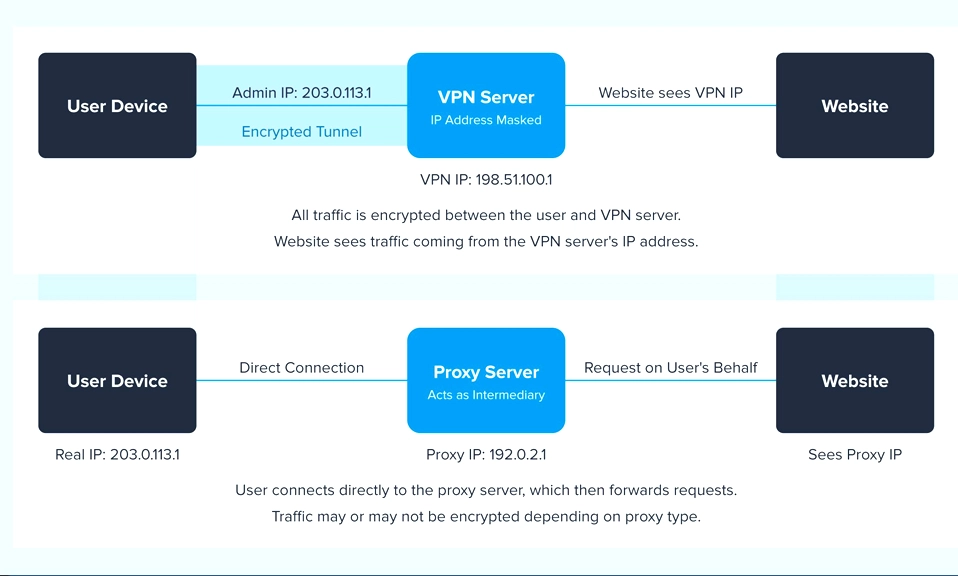
What it is: A proxy server acts as an intermediary between your device and the internet. When you request a webpage, the request goes to the proxy first. The proxy fetches the website and hands it back to you. To the website, it looks like the proxy visited the site, not you.
The Analogy: Imagine you want to buy a rare book, but you don’t want the bookstore to know your home address. You hire a personal assistant (the proxy). You give the assistant the book title, they go to the store, buy it, and bring it to you. The bookstore only knows the assistant’s name, not yours.
The Pros:
- Fast: Because there is no encryption overhead, proxies can be very fast for simple tasks.
- App-Specific: You can route just one specific app (like your web browser or a torrent client) through a proxy, leaving the rest of your system on your normal connection.
- Cheap (or Free): Many basic proxy services are free or very low-cost.
The Cons:
- Zero Encryption: This is the biggest flaw. A proxy only hides your IP address; it does not encrypt your data. If you send a password or credit card number through a proxy, anyone intercepting the traffic (like your ISP or a hacker on public Wi-Fi) can still read it in plain text.
- Privacy Risks: Many free proxy servers make money by logging your browsing data and selling it to advertisers. You are trading your IP address for their data-harvesting.
🛡️ 2. The VPN (Virtual Private Network): The “Armored Tunnel”
What it is: A VPN also routes your traffic through a remote server, hiding your IP address. However, it does something a proxy cannot: it creates a heavily encrypted “tunnel” between your device and the VPN server.
The Analogy: Instead of just hiring an assistant, you put your letter inside a locked, armored titanium briefcase, hand it to the assistant, and they drive it through a secure, underground tunnel to the destination. Even if someone intercepts the briefcase, they cannot open it or read what’s inside.
The Pros:
- Total Encryption: All data leaving your device is scrambled. Your ISP, hackers, and government agencies can see that you are connected to a VPN, but they cannot see what you are doing.
- System-Wide Protection: A VPN protects every application on your device simultaneously (browser, email client, games, background apps).
- Strong Privacy: Reputable, paid VPN providers operate under strict “no-logs” policies, meaning they do not record your browsing history.
The Cons:
- Slight Speed Drop: The process of encrypting and decrypting data takes a tiny bit of processing power, which can slightly reduce your maximum internet speed (though modern protocols like WireGuard have made this difference almost unnoticeable).
- Cost: While free VPNs exist, they are often just as dangerous as free proxies. A reliable, secure VPN requires a monthly or annual subscription.
⚔️ Head-to-Head Breakdown
Feature | Proxy Server | VPN (Virtual Private Network) |
|---|---|---|
Hides IP Address? | Yes | Yes |
Encrypts Data? | No (Plain text) | Yes (Military-grade encryption) |
Scope of Protection | App-by-app (e.g., browser only) | Entire device (all apps and traffic) |
Speed | Very Fast (no encryption overhead) | Fast (slight overhead, but negligible with good providers) |
Privacy/Logging | High risk (many free proxies log & sell data) | Low risk (reputable paid VPNs have strict no-logs policies) |
Cost | Often Free or very cheap | Usually requires a paid subscription ($3–$10/month) |
🏆 Which Is Better for You?
The “better” tool entirely depends on what you are trying to achieve.
Choose a Proxy IF:
- You need to quickly bypass a simple, low-stakes geo-block (like watching a specific YouTube video not available in your region).
- You only need to hide your IP for one specific application (like a web scraper or a specific game) and want to keep the rest of your traffic on your normal, fast connection.
- You are on a strict budget and understand the privacy trade-offs of using a free service.
Choose a VPN IF:
- You are using public Wi-Fi (coffee shops, airports, hotels) and need to protect your passwords and financial data from hackers.
- You want to hide your browsing history from your Internet Service Provider (ISP).
- You are torrenting or downloading files and want to protect your identity and avoid copyright strikes.
- You want system-wide protection for your phone, laptop, and tablet without configuring each app individually.
Don’t Compromise on Security
If your goal is simply to trick a website into thinking you are in another country for a few minutes, a proxy might do the trick.
But if your goal is privacy, security, and peace of mind, a VPN is the undisputed champion. The internet is an increasingly hostile place for personal data. Relying on a proxy is like locking your front door but leaving all your windows wide open. A VPN locks the whole house.
Invest in a reputable, audited, no-logs VPN provider (like Mullvad, ProtonVPN, or NordVPN), and let it run in the background. It’s the single most effective upgrade you can make to your digital security.