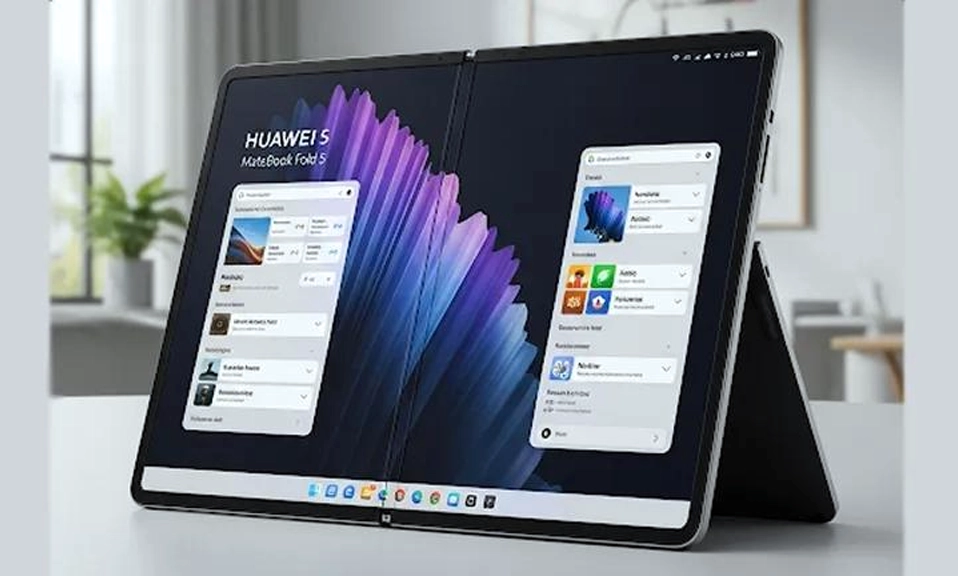
Huawei’s new foldable laptop is not a laptop you open. That’s the entire pitch, and it’s either a stroke of genius or an admission of defeat—depending on how you feel about the last three years of foldable PCs.
The MateBook Fold S arrives in China on November 14, 2026, with reservations opening at 10:08. It is a 14.7-inch foldable PC that weighs roughly 600 grams and folds down to about the size of an A5 notebook. But the headline feature is not the folding screen. It is the small, square “Live Mini Display” embedded in the lid—a second screen that lets you check notifications, glance at your calendar, and read messages without ever opening the laptop.
For years, foldable laptops have been solutions in search of a problem. The Lenovo ThinkPad X1 Fold 16 was quietly abandoned to the “bad idea pile,” and the HP Spectre Fold was “an awkward laptop that didn’t do the job of a laptop or tablet all that well”. Huawei’s MateBook Fold, with its 18-inch screen, was impressive but niche—a $3,700 statement piece for people who wanted a giant tablet that could occasionally pretend to be a laptop.
The MateBook Fold S is Huawei’s attempt to make the foldable laptop small enough, light enough, and useful enough to carry every day. The question is whether the cover screen is the feature that finally makes the category make sense—or whether it’s a clever workaround for a form factor that still hasn’t found its purpose.
What the MateBook Fold S Actually Is
The specs, as confirmed by Huawei and reported by Chinese tech media, paint a picture of a device that is aggressively focused on portability.
| Feature | Specification |
|---|---|
| Inner display | 14.7-inch flexible OLED, 3.3K resolution, 1600 nits peak brightness, 90Hz LTPO adaptive refresh |
| Cover display | Small square “Live Mini Display” on the lid, similar in layout to the Huawei Pura X foldable phone’s cover screen |
| Weight | Approximately 600g (body only); 649g measured, plus 190g for the detachable keyboard |
| Processor | Kirin X9 series self-developed chip |
| Operating system | HarmonyOS 6.1 (some reports say HarmonyOS 7.0) |
| Battery | 70Wh (some reports suggest 75Wh), 66W fast charging (some reports say 140W Turbo charging) |
| Hinge | Huawei’s “Basalt Waterdrop” hinge with UTG ultra-thin glass |
| Cameras | Outer: 50MP main + 12.5MP ultrawide; Inner: 8MP |
| Ports | Dual USB-C, Wi-Fi 7, Bluetooth 6.0, six cooling vents |
| Stylus | Supports Huawei M-Pencil |
| Colors | Cloud Sea Blue (two-tone), Sky White, Phantom Night Black |
| Price | Expected starting around ¥17,999 (roughly $2,500), with some reports suggesting up to ¥20,000 |
Sources: EET-China, NetEase, SMZDM, Memeburn, PC Pop
The key numbers are the weight and the cover screen. At 600 to 649 grams, the Fold S is roughly half the weight of a typical 14-inch ultrabook (which usually sits between 1.2 and 1.4 kg). When folded, it is about 10.2 inches—small enough to hold in one hand or slip into a small bag. The cover screen is the feature that lets you use the device without opening it, solving one of the most persistent complaints about foldable PCs: when they’re closed, they’re just an expensive slab.
The Cover Screen: A Solution to a Real Problem, or a Workaround?
Huawei is not the first company to put a screen on the outside of a foldable device. The company’s own Pura X foldable phone has one. Samsung’s Galaxy Z Fold series has one. But the MateBook Fold S is the first foldable PC to adopt the idea.
The use cases are straightforward and, on paper, genuinely useful. You can check WeChat messages, preview your calendar, and read quick memos without unfolding the 14.7-inch screen. If you’re commuting, waiting for a meeting, or walking between appointments, the cover screen gives you the information you need in a glance, without the ritual of opening a laptop, waiting for it to wake, and finding the right app.
But there is a catch. The cover screen is small—roughly the size of a phone screen—and its functionality is limited to glanceable information and quick actions. It is not a replacement for the main display. It is a notification ticker, a clock, a calendar preview, and a quick-capture tool. For some people, that will be enough to justify the form factor. For others, it will feel like a feature that exists to solve a problem the foldable design created in the first place.
The Gizmodo analysis put it bluntly: “The folding laptop concept isn’t entirely new, but the way Huawei is pushing it certainly is”. The question is whether “pushing it” means making it better or making it smaller.
The Trade-Offs: What 600 Grams Costs You
The MateBook Fold S is light because Huawei made deliberate compromises. The most significant is performance. The Kirin X9 series chip is a self-developed processor, and while Huawei has optimized HarmonyOS to work efficiently with its own silicon, the Fold S is not a workstation replacement. The SMZDM review is candid: the device’s value is in portability and form-factor flexibility, not in performance benchmarks. It is a “second computer”—a device for commutes, quick document edits, presentations, and note-taking, not for video editing, 3D modeling, or heavy multitasking.
The second compromise is the software ecosystem. HarmonyOS has made significant progress—more than 19,000 PC applications are now available, covering office work, media, and finance. But Adobe’s Creative Cloud, AutoCAD, SolidWorks, MATLAB, and other professional-grade tools still do not have native HarmonyOS versions. Users who depend on these applications must rely on virtual machines or compatibility layers, which adds friction and reduces performance. For developers, the situation is even more restrictive: HarmonyOS PC lacks official toolchains for Node.js, Python, Java, and even Huawei’s own DevEco Studio for native app development on the device itself.
The third compromise is durability and repairability. Foldable screens are inherently more fragile than rigid ones, and the MateBook Fold S’s UTG glass and waterdrop hinge are engineered for longevity—but they are still a moving-parts mechanism in a device that is designed to be carried everywhere. Huawei has not published detailed repairability information, and the long-term reliability of the cover screen—which is exposed to the same scratches and impacts as the rest of the lid—remains an open question.
How It Compares: The Foldable Laptop Landscape
The MateBook Fold S enters a market that is still tiny. In the first half of 2026, foldable laptop shipments crossed one million units for the first time, reaching 1.1 million units—a 215% year-over-year increase. But foldable laptops still represent a fraction of the foldable device market, which is dominated by smartphones (93.5% of shipments). The category is growing, but it is not yet mainstream.
| Device | Screen | Weight | Price | OS | Key Limitation |
|---|---|---|---|---|---|
| Huawei MateBook Fold S | 14.7-inch foldable OLED | ~600g | ~¥17,999+ | HarmonyOS | Limited professional software ecosystem |
| Huawei MateBook Fold (18-inch) | 18-inch foldable OLED | ~1.16kg | ¥23,499+ | HarmonyOS | Larger, heavier, more expensive |
| Lenovo ThinkPad X1 Fold 16 | 16.3-inch foldable OLED | ~1.26kg | ~$2,499–$3,799 | Windows 11 | Heavier, older design, limited battery life |
| Asus Zenbook 17 Fold OLED | 17.3-inch foldable OLED | ~1.50kg | ~$3,500–$4,650 | Windows 11 | Heaviest, most expensive, limited availability |
Sources: EET-China, SMZDM, Lenovo, Asus, TechSpot, SkyGadgets
Huawei’s advantage is weight and price. At 600 grams, the Fold S is dramatically lighter than any other foldable laptop on the market. At an expected ¥17,999–¥20,000 (roughly $2,500–$2,800), it undercuts the ThinkPad X1 Fold 16 and the Zenbook 17 Fold OLED, while offering a more portable form factor. Its disadvantage is software: Windows-based competitors can run the full suite of professional applications, while HarmonyOS cannot.
The Lenovo ThinkPad X1 Fold 16 remains the choice for users who need Windows compatibility and a larger screen. The Asus Zenbook 17 Fold OLED is the choice for users who want the largest foldable display and are willing to pay a premium. The MateBook Fold S is the choice for users who prioritize portability above all else and are willing to accept the HarmonyOS ecosystem’s limitations.
Is This the Future of Foldable Laptops?
The MateBook Fold S is not the future of laptops. It is a preview of a future that may or may not arrive.
The device makes a compelling case for a specific kind of foldable laptop: a lightweight, cover-screen-equipped companion device for people who live in the Huawei ecosystem and need something more capable than a phone but more portable than a traditional laptop. For the commuter who wants to read documents on a train, the salesperson who needs to show a presentation at a client site, or the Huawei loyalist who wants a single device that bridges the gap between tablet and laptop, the Fold S is a genuinely innovative product with no direct competitor.
But the compromises are real. The HarmonyOS ecosystem is not yet ready to replace Windows for professional work. The performance is adequate but not exceptional. The cover screen is useful but limited. And the price—while lower than its foldable rivals—is still high for a device that is explicitly positioned as a second computer rather than a primary one.
The foldable laptop category has been held back by three things: weight, price, and utility. The MateBook Fold S addresses the first two. It is the lightest foldable laptop ever made, and it is cheaper than its competitors. Whether it addresses the third—whether the cover screen and the smaller form factor make the device genuinely more useful than a conventional ultrabook—depends entirely on who you are and what you need.
For most people, a $1,000 conventional laptop will do everything the Fold S can do, and more, without the compromises. For a specific subset of users—Huawei ecosystem loyalists, frequent travelers who value every gram, and early adopters who want to be part of the foldable future—the MateBook Fold S is a compelling, beautifully engineered, and genuinely innovative device.
It is not the future of all laptops. But it might be the future of your laptop, if you’re the right kind of user.